How to Get the Most Out of Vibe Coding
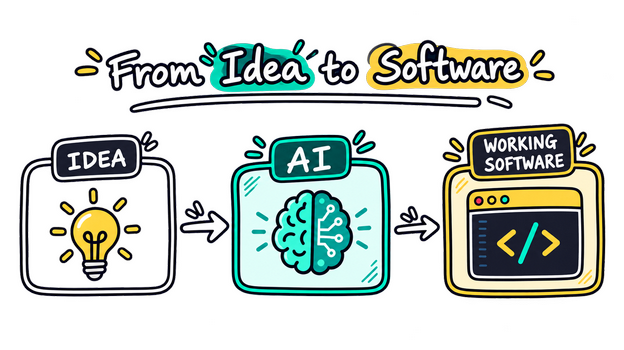
Vibe coding has changed the way people build software.
Instead of spending hours writing every function manually, developers can describe what they want in natural language and let AI generate much of the code. This makes it possible to turn an idea into a working prototype much faster.
But there is a catch: vibe coding works best when you know how to guide the AI.
Simply telling an AI, “Build me an app,” usually produces messy or unreliable results. The real skill is learning how to communicate your idea, control the development process, and review what the AI creates.
Here is how to get the most out of vibe coding.
1. Start With the Idea, Not the Code#
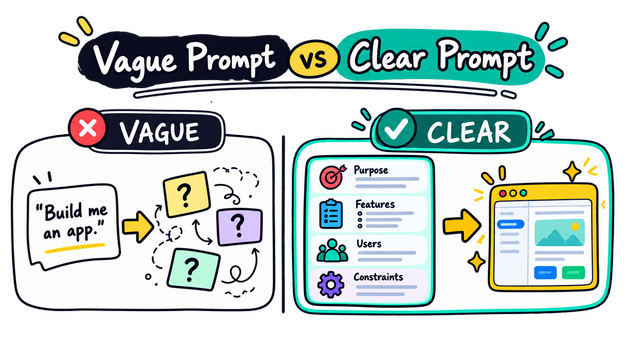
Before asking AI to write code, describe what you are actually trying to build.
Think about:
What is the purpose of the project?
Who will use it?
What are the main features?
What should the user be able to do?
What should the interface look and feel like?
What are the limitations?
For example, instead of:
Build me a task app.
Try:
I want a simple task-management web app for personal use. Users should be able to create, edit, complete, and delete tasks. Tasks should be grouped by status, and the interface should be clean and minimal. Start with the basic task functionality before adding advanced features.
The second prompt gives the AI a much clearer direction.
The better you understand your idea, the better AI can implement it.
2. Build in Small Steps#
One of the biggest mistakes in vibe coding is asking AI to build the entire project in one prompt.
Large requests often create large problems.
Instead, break the project into small milestones.
For example:
Create the basic project structure.
Build the main page.
Add navigation.
Add the database.
Implement authentication.
Add the main feature.
Improve the UI.
Add error handling.
Test everything.
Clean up the code.
After each step, run the application and check the result.
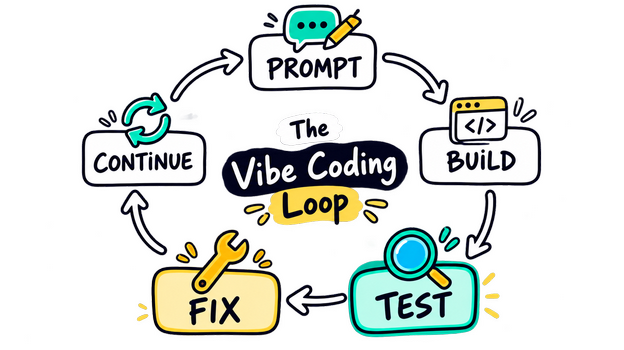
This creates a simple loop:
Prompt → Build → Test → Fix → Continue
That loop is at the heart of effective vibe coding.
3. Give AI Context Before Giving Instructions#
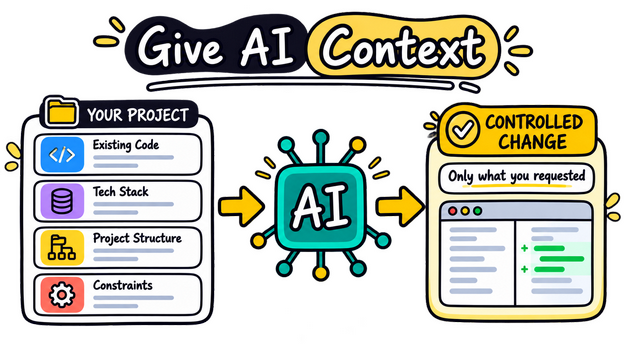
AI performs much better when it understands the existing project.
When working on a project, tell it things such as:
What technology you are using
How the project is structured
What has already been implemented
What you want to change
What you do not want changed
What errors you are currently seeing
For example:
This is a React application using TypeScript. The authentication system is already working. Do not change the authentication logic. I only want to redesign the dashboard while keeping the existing API calls and data structure.
This is much safer than:
Redesign the dashboard.
The more relevant context you provide, the fewer unnecessary changes the AI is likely to make.
4. Treat AI Like a Developer on Your Team#
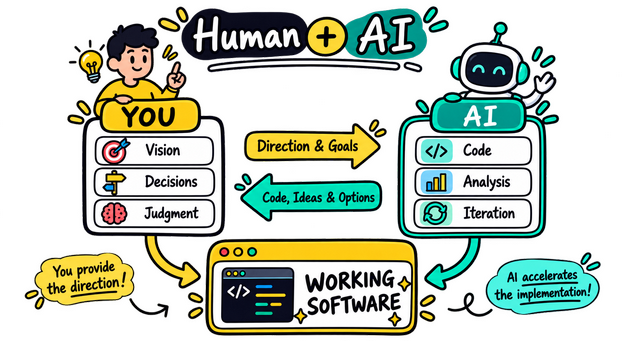
A useful mindset is to think of AI as a developer working alongside you.
You are still the person making the architectural decisions.
AI can help you:
Write code
Explain unfamiliar code
Find bugs
Refactor components
Generate tests
Create documentation
Suggest approaches
Investigate errors
Prototype ideas
But you should not blindly accept everything it produces.
Ask questions like:
Why did you choose this approach?
What are the potential problems with this implementation?
Is there a simpler solution?
Does this scale if the number of users increases?
Which files need to change?
This turns vibe coding from “AI writes everything” into “AI helps me build faster.”
5. Don't Fix Problems With More Problems#
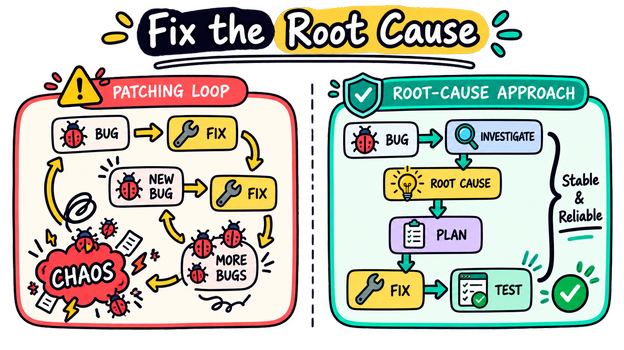
A common vibe-coding trap looks like this:
You ask AI to build something.
It introduces a bug.
You ask it to fix the bug.
The fix creates another bug.
You ask it to fix that bug.
Soon, the project becomes a collection of patches.
When this happens, stop.
Instead, ask the AI to investigate the underlying problem:
Stop making changes for now. Analyze why this system is failing. Identify the root cause and explain which parts of the architecture should be changed before implementing a fix.
Sometimes the correct solution is not another patch.
It is restructuring the code.
6. Use AI for Debugging, Not Just Generation#
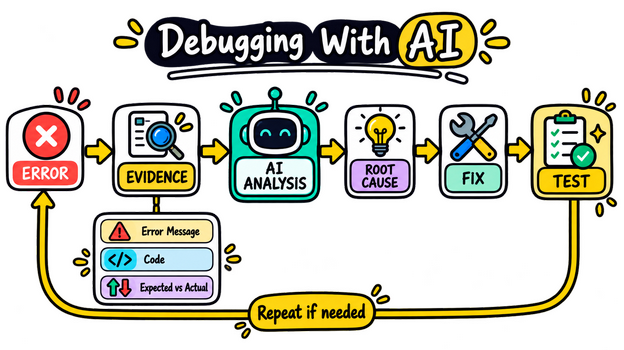
One of the most powerful uses of vibe coding is debugging.
When something breaks, don't simply say:
It doesn't work.
Give the AI useful evidence.
Include:
The error message
The relevant code
What you expected to happen
What actually happened
The steps that reproduce the problem
For example:
When I click the Save button, the application crashes. I expected the form to submit and update the database. Here is the browser console error and the relevant component. Find the root cause before changing the code.
This gives AI something concrete to reason about.
7. Ask for One Change at a Time#
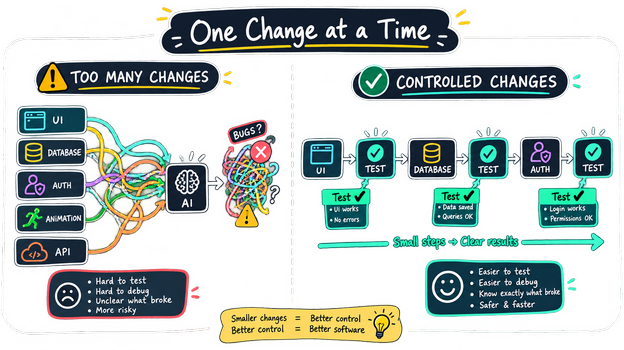
If you want to change ten things simultaneously, it becomes difficult to determine which change caused a problem.
Instead of:
Change the colors, redesign the navigation, add animations, improve mobile support, optimize the database, and add authentication.
Do this:
First, redesign the navigation. Do not change anything else.
Then test it.
Next:
Now improve the mobile layout without changing the navigation behavior.
Then test again.
This may feel slower, but it usually makes the overall process much faster because you spend less time debugging unexpected changes.
8. Give AI Constraints#
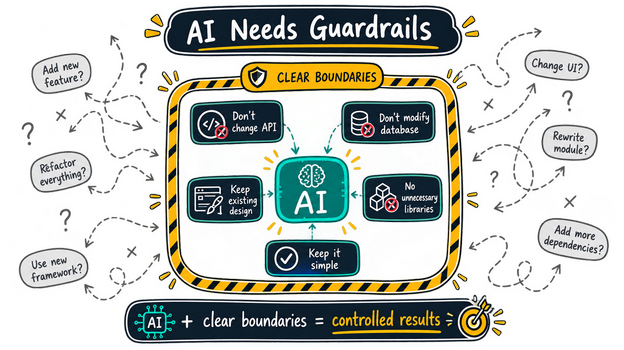
Good vibe coding isn't just about telling AI what to do.
It is also about telling it what not to do.
Useful constraints include:
Do not install additional libraries unless necessary.
Do not modify the database schema.
Keep the existing API.
Do not rewrite working components.
Use the existing design system.
Keep the implementation simple.
Do not create duplicate functionality.
Constraints prevent AI from taking unnecessary paths.
9. Make AI Explain Before It Changes Important Things#
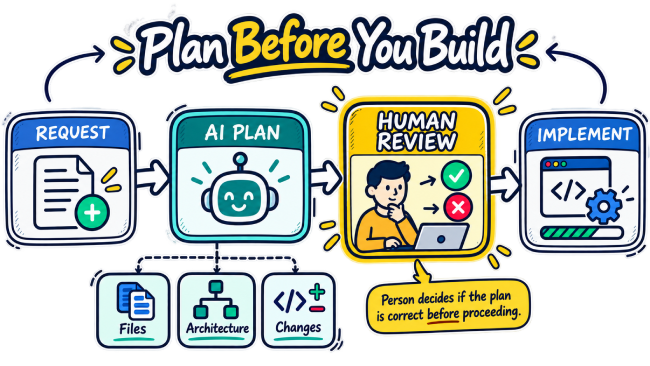
For small changes, you can usually let AI implement them directly.
For important architectural changes, ask it to explain its plan first.
For example:
Before writing code, inspect the project and propose a plan for implementing the notification system. List the files you would change and explain why.
Then review the plan.
If the plan looks wrong, correct it before any code is written.
This is particularly useful for:
Databases
Authentication
APIs
Payment systems
Large refactors
Application architecture
Performance optimization
10. Keep Your Project Organized#
Vibe coding becomes much easier when the project itself is organized.
Use clear:
File names
Component names
Folder structures
Function names
Documentation
Configuration files
Avoid letting AI create random files everywhere.
If the project becomes difficult to understand, ask AI to help organize it:
Analyze the current project structure and suggest improvements. Do not modify anything yet.
Review the suggestions before implementing them.
A clean project gives both you and the AI a better environment to work in.
11. Commit Before Major Changes#
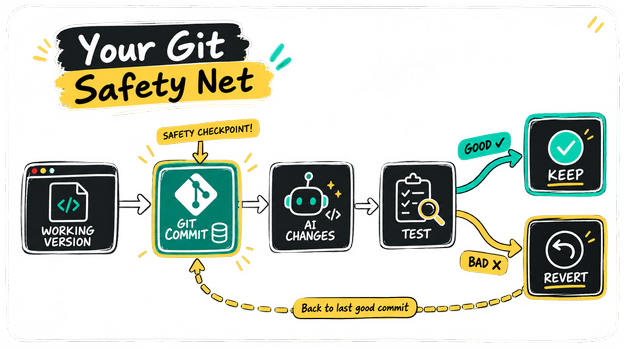
If you use Git, commit your working project before asking AI to make a significant change.
That gives you a safety net.
If the AI makes the project worse, you can return to the previous working state.
A simple workflow is:
Working version → Git commit → AI changes → Test → Keep or revert
This is especially important when experimenting.
12. Use AI to Learn While You Build#
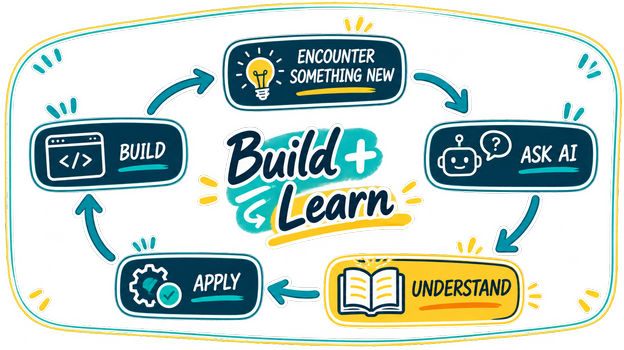
You don't need to understand every line of code immediately.
But you should understand the important parts.
If AI creates something unfamiliar, ask:
Explain this implementation to me as if I understand basic programming but am unfamiliar with this technology.
You can also ask:
Which parts of this code are important for me to understand?
This allows you to learn naturally while building real projects.
Vibe coding can therefore be more than a productivity technique.
It can also become a learning tool.
13. Don't Optimize Too Early#
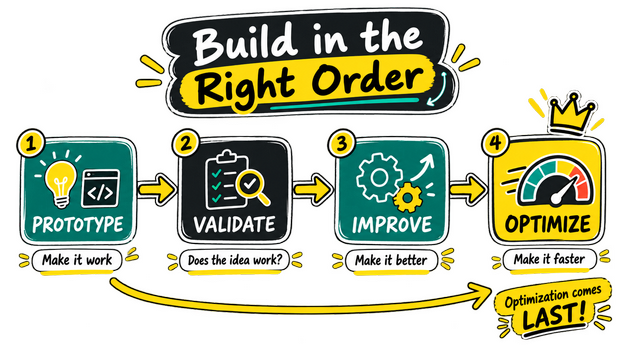
When building a new idea, your first goal should usually be to make it work.
Don't spend hours optimizing code that may be thrown away tomorrow.
A useful progression is:
Prototype → Validate → Improve → Optimize
First prove that the idea works.
Then improve the architecture.
Then optimize the parts that actually need optimization.
14. Test What AI Builds#
AI-generated code can look convincing while still containing bugs.
Always test the important paths.
For a web application, check things such as:
Creating data
Editing data
Deleting data
Invalid input
Empty states
Error states
Mobile layouts
Authentication
Permissions
Refreshing the page
Network failures
You can also ask AI to generate tests:
Analyze this feature and create tests for the normal cases, edge cases, and failure cases.
Then run those tests yourself.
15. Give AI Feedback Based on Results#
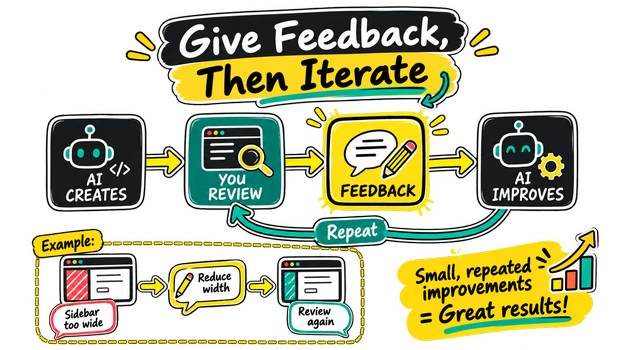
Don't repeatedly rewrite your original prompt.
Instead, react to what you see.
For example:
The layout is good, but the sidebar is too wide. Reduce its width and keep everything else unchanged.
Then:
The spacing is better. Now make the cards more compact.
This creates an iterative design process.
It is similar to working with a human designer or developer.
The Best Vibe Coding Workflow
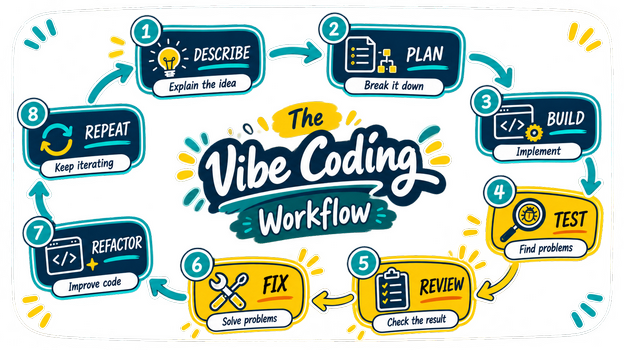
A strong workflow can be surprisingly simple:
Step 1 — Describe#
Explain the idea and requirements.
Step 2 — Plan#
Ask AI to break the project into manageable tasks.
Step 3 — Build#
Implement one task at a time.
Step 4 — Test#
Run the application after each meaningful change.
Step 5 — Review#
Check whether the implementation actually matches your requirements.
Step 6 — Fix#
Give AI precise feedback about problems.
Step 7 — Refactor#
Once the feature works, improve the code where necessary.
Step 8 — Repeat#
Continue until the project reaches the desired state.
The Biggest Secret: Your Prompts Are Not the Product
A common misconception is that becoming good at vibe coding means learning how to write extremely complicated prompts.
It doesn't.
The most effective prompts are often simple and specific.
The real skill is knowing what you want, breaking problems down, recognizing when something is wrong, and giving useful feedback.
AI can generate code incredibly quickly.
That means your bottleneck is no longer necessarily typing code.
Your bottleneck becomes thinking clearly.
Final Thoughts
Vibe coding makes software development dramatically more accessible.
You can go from an idea to a prototype without manually writing every piece of code. You can experiment with technologies you don't know well, build interfaces quickly, and use AI as a powerful development partner.
But the best results don't come from giving AI one massive prompt and hoping for the best.
They come from a disciplined process:
Think clearly.
Start small.
Give context.
Set constraints.
Build incrementally.
Test constantly.
Fix root causes.
Review the code.
Keep learning.
The goal isn't to let AI replace your thinking.
The goal is to use AI so that your thinking turns into working software much faster.
Rate this article
Be the first to rate this article
Comments & Discussion0
Related articles
Demystifying Container as a Service (CaaS): A Complete Guide to Modern Cloud Architecture  DevOps & Containers
Demystifying Container as a Service (CaaS): A Complete Guide to Modern Cloud Architecture
In the fast-paced world of software development, engineering teams are constantly searching for ways to build, ship, and scale applications faster wit...
Mohammed Qaid