Disaster Recovery Foundations: Architecting a Modern DRaaS Strategy
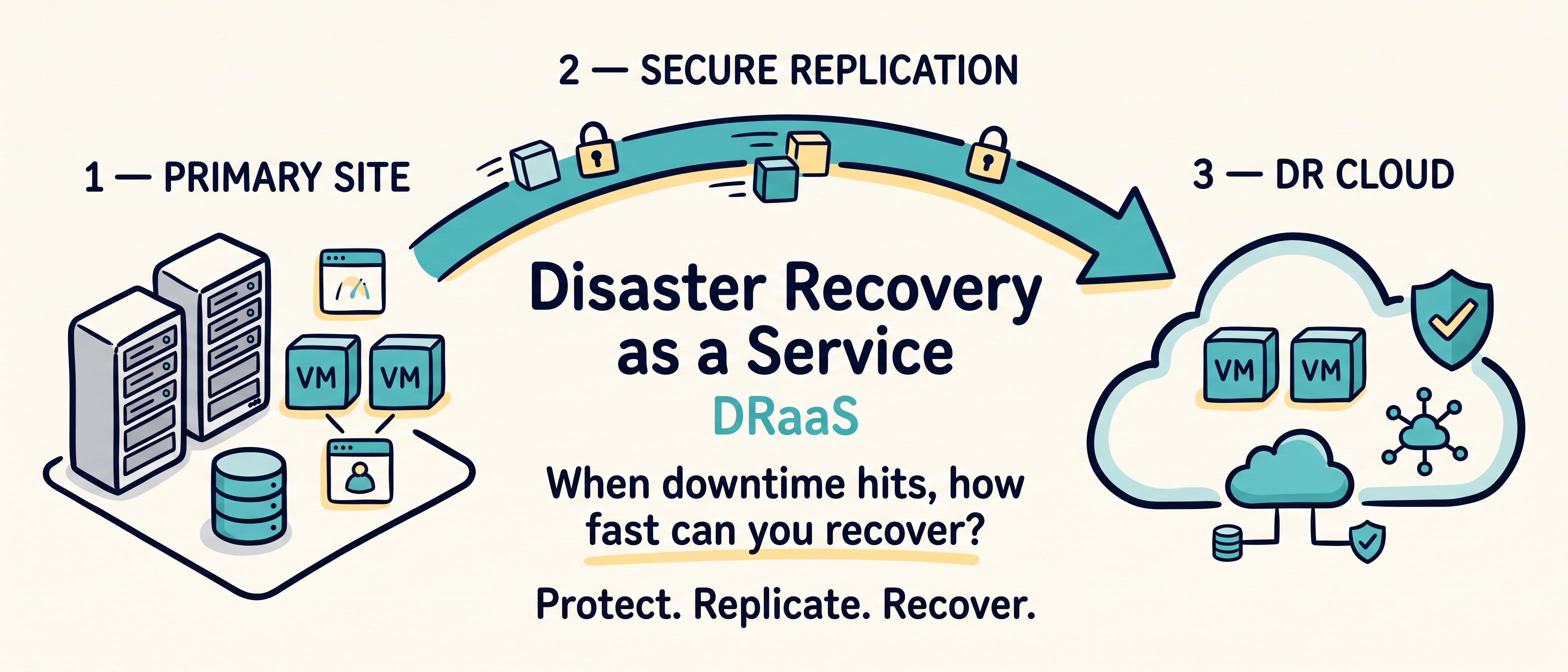
Disaster recovery is not just about copying virtual machines to another location.
It is about knowing what must recover first, how much data the business can afford to lose, how quickly services must return, and exactly what has to happen when the primary environment is unavailable.
Cloud infrastructure can provide the secondary compute, storage, and networking capacity. But the real success of Disaster Recovery as a Service (DRaaS) depends on architecture, recovery objectives, replication design, automation, testing, and operational discipline.
Here is how to build a stronger modern DRaaS strategy:
1. Start With Business Impact, Not Technology#
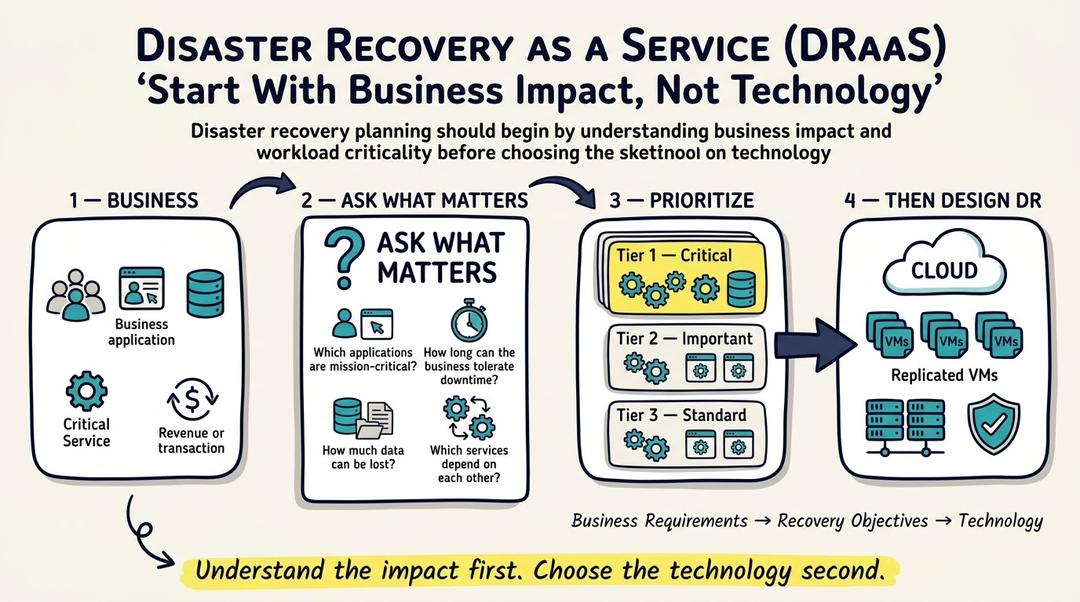
Before choosing replication software, cloud capacity, or a recovery site, define what the business actually needs to protect.
Start by asking:
Which applications are truly mission-critical?
What happens if they are unavailable for 15 minutes, 2 hours, or a full day?
Which systems depend on databases, identity, DNS, or external services?
Which teams must be involved during recovery?
The better you understand the business impact, the better you can design the recovery architecture.
2. Define RPO and RTO Before Choosing the Platform#
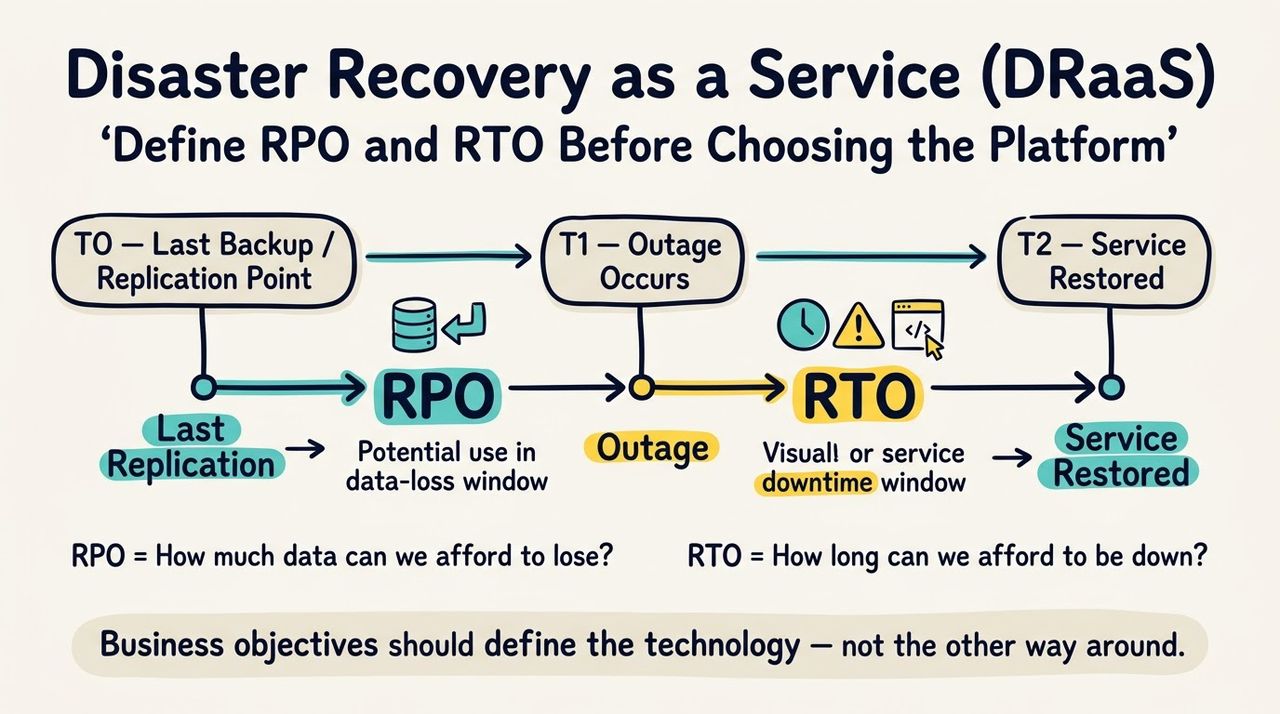
RPO and RTO are the two numbers that shape almost every DR decision.
Recovery Point Objective (RPO): how much data loss the business can tolerate.
Recovery Time Objective (RTO): how long the service can remain unavailable.
Different workloads should have different recovery targets.
Targets should drive replication frequency, bandwidth, automation, and cost.
RPO and RTO are business requirements first and infrastructure settings second.
3. Design for More Than Hardware Failure#
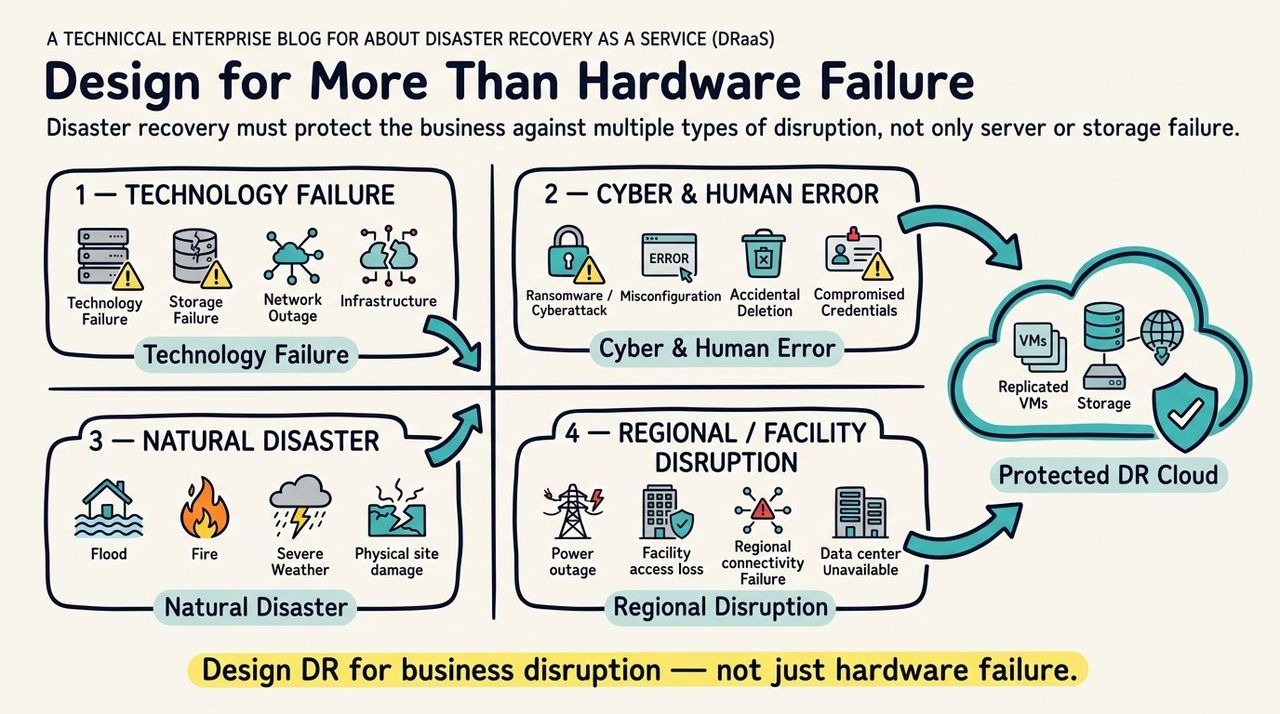
A resilient architecture assumes that outages can come from technology, people, cyber incidents, or the physical environment.
Host, storage, network, and power failures
Human error and accidental deletion
Ransomware and credential compromise
Natural disasters and facility outages
Regional or physical access disruptions
A strong DR strategy protects against both infrastructure loss and logical corruption.
4. Use Backup and DRaaS Together#
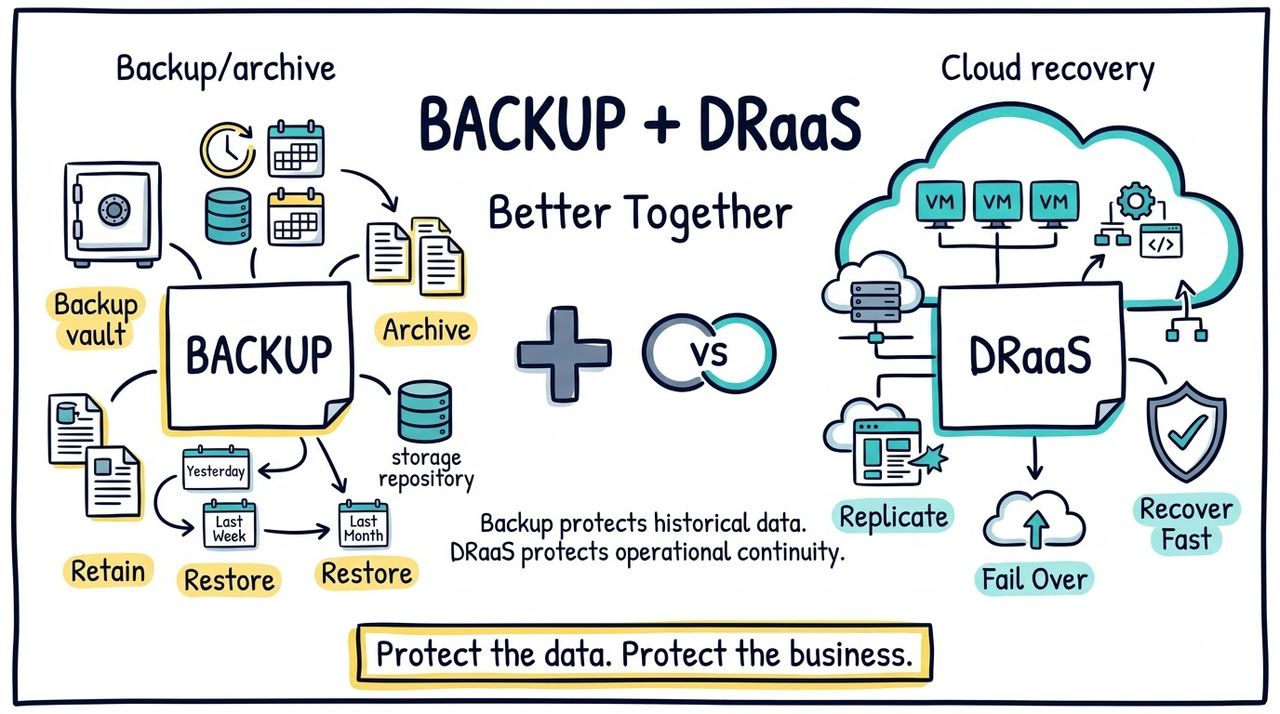
Backups and DRaaS solve different problems, and a mature resilience strategy normally needs both.
Primary Goal
BaaS: Retention and recoverable copies
DRaaS: Application continuity
Typical Recovery
BaaS: Restore data or systems
DRaaS: Start replicated workloads
Best Fit
BaaS: File recovery, archive, compliance
DRaaS: Site outage, cyber recovery, fast failover
Backups preserve historical recovery points and long-term retention.
DRaaS keeps workloads close to a recoverable running state.
Backups are ideal for file recovery, archive, and compliance.
DRaaS is designed for application continuity, failover, and rapid restoration.
Backup protects the data history. DRaaS protects the ability to resume operations.
5. Choose the Right Replication Model#
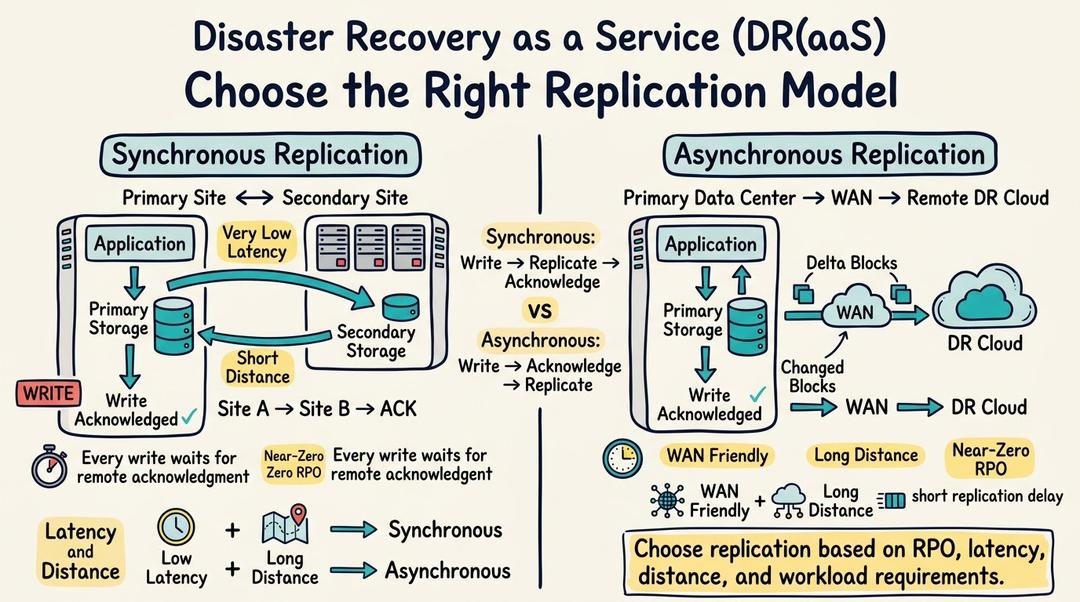
Replication timing has a direct impact on latency, distance, and potential data loss.
Synchronous replication can target near-zero or zero RPO but requires very low latency.
Asynchronous replication works better across WAN links and longer geographic distances.
Replication design should match the workload's change rate and recovery target.
Bandwidth, latency, and distance must be considered together.
The fastest replication model is not always the best architecture.
6. Choose Where Replication Happens#
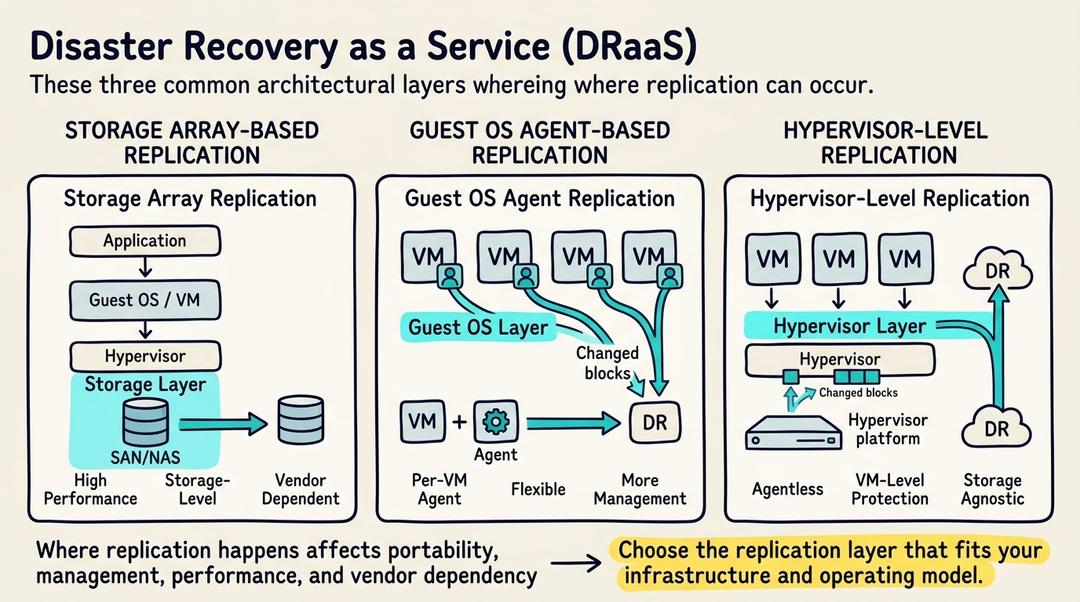
Replication can happen at the storage layer, inside the guest operating system, or at the virtualization layer.
Storage-array replication offers deep storage integration but may increase vendor dependency.
Guest-agent replication can work across heterogeneous platforms but adds guest management.
Hypervisor-level replication protects VMs without installing an agent in every guest.
The right layer depends on platform design, operational overhead, and portability.
Choose a replication layer that fits both the infrastructure and the operating model.
7. Select the Right Recovery Site#
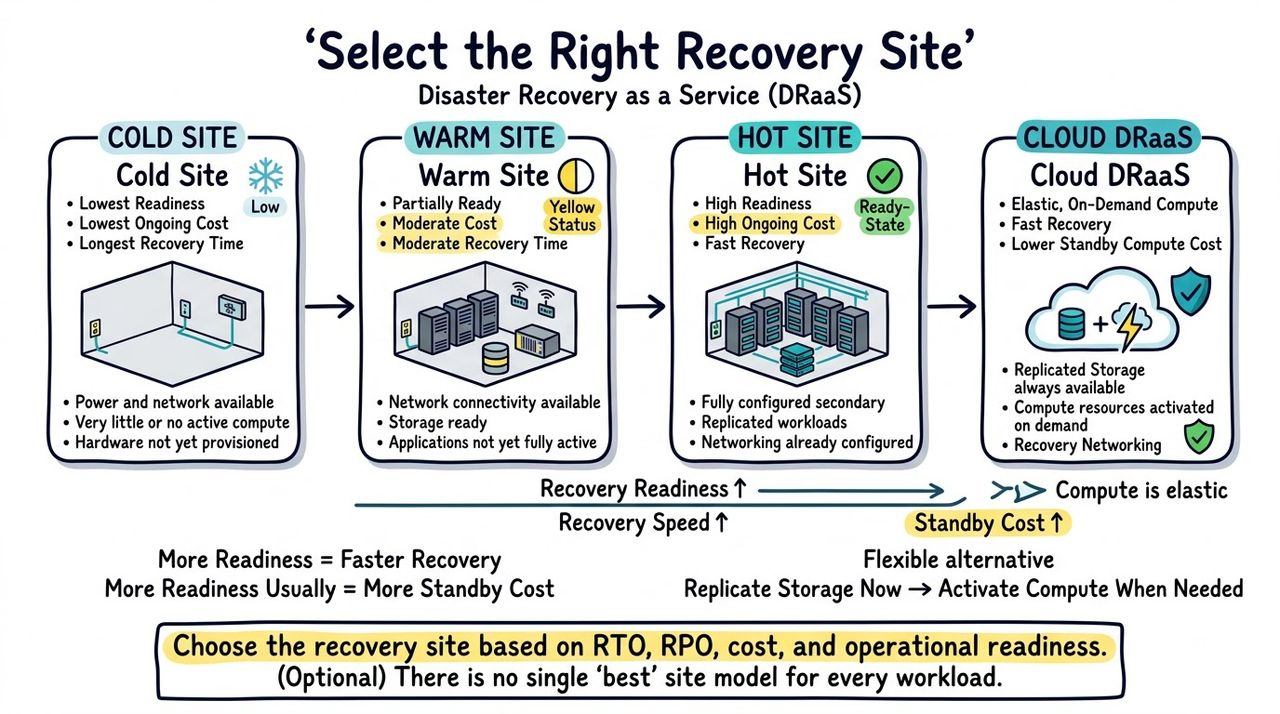
Recovery sites range from inexpensive cold facilities to fully operational hot sites and elastic cloud targets.
Cold sites minimize standby cost but usually have long recovery times.
Warm sites keep some infrastructure ready but still require restoration or activation.
Hot sites provide fast recovery at higher ongoing cost.
Cloud DRaaS can keep storage synchronized while activating compute only when needed.
Recovery speed and standby cost are always connected.
8. Plan Network Recovery as Carefully as VM Recovery#
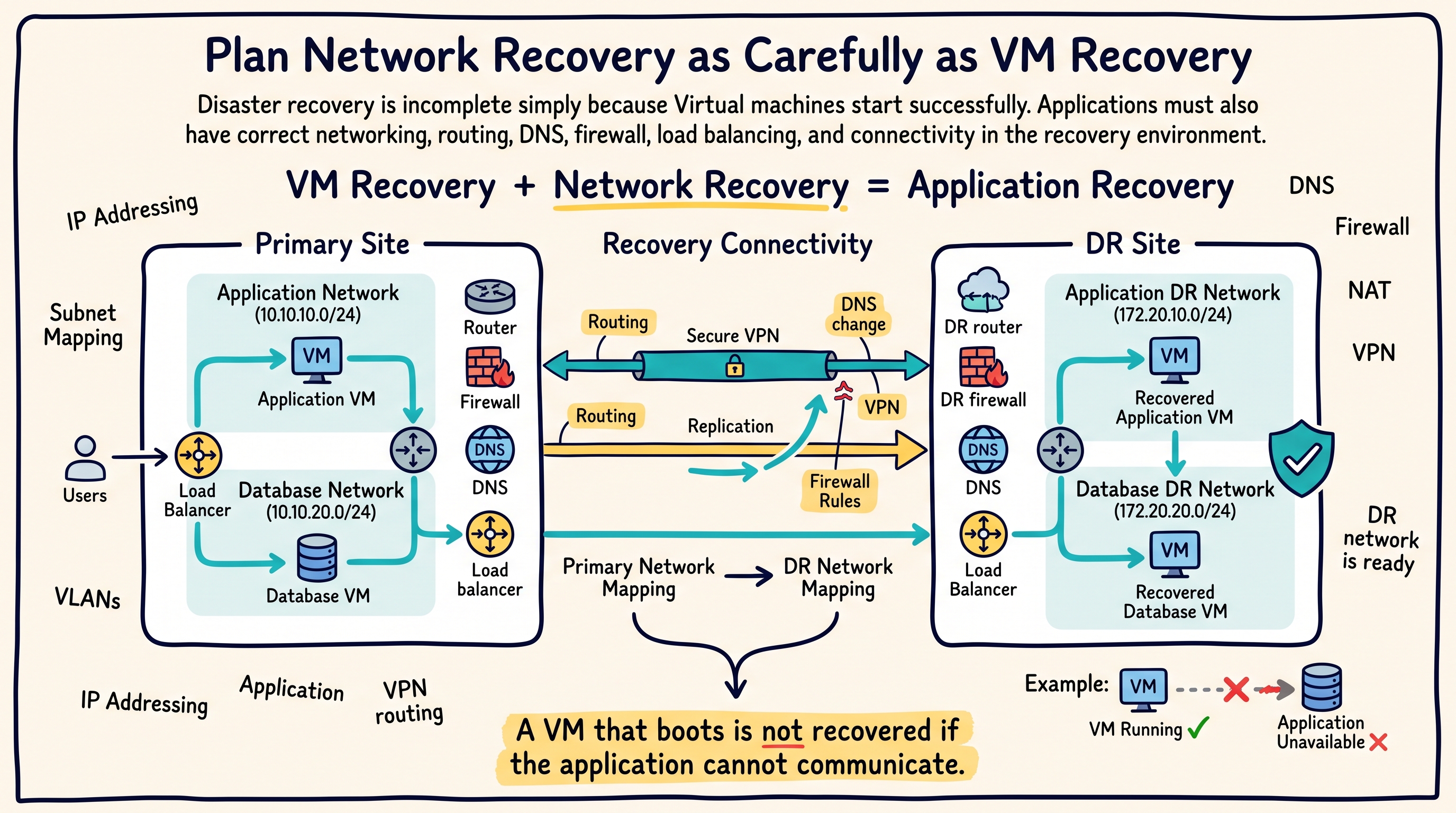
Many DR tests fail because the virtual machines start, but the network does not.
IP address changes and subnet mapping
VLANs and routing
DNS updates
NAT and firewall rules
Load balancers and VPNs
Security groups and external dependencies
A VM that boots successfully is not recovered if the application cannot communicate.
9. Use Point-in-Time Recovery for Logical Failures#
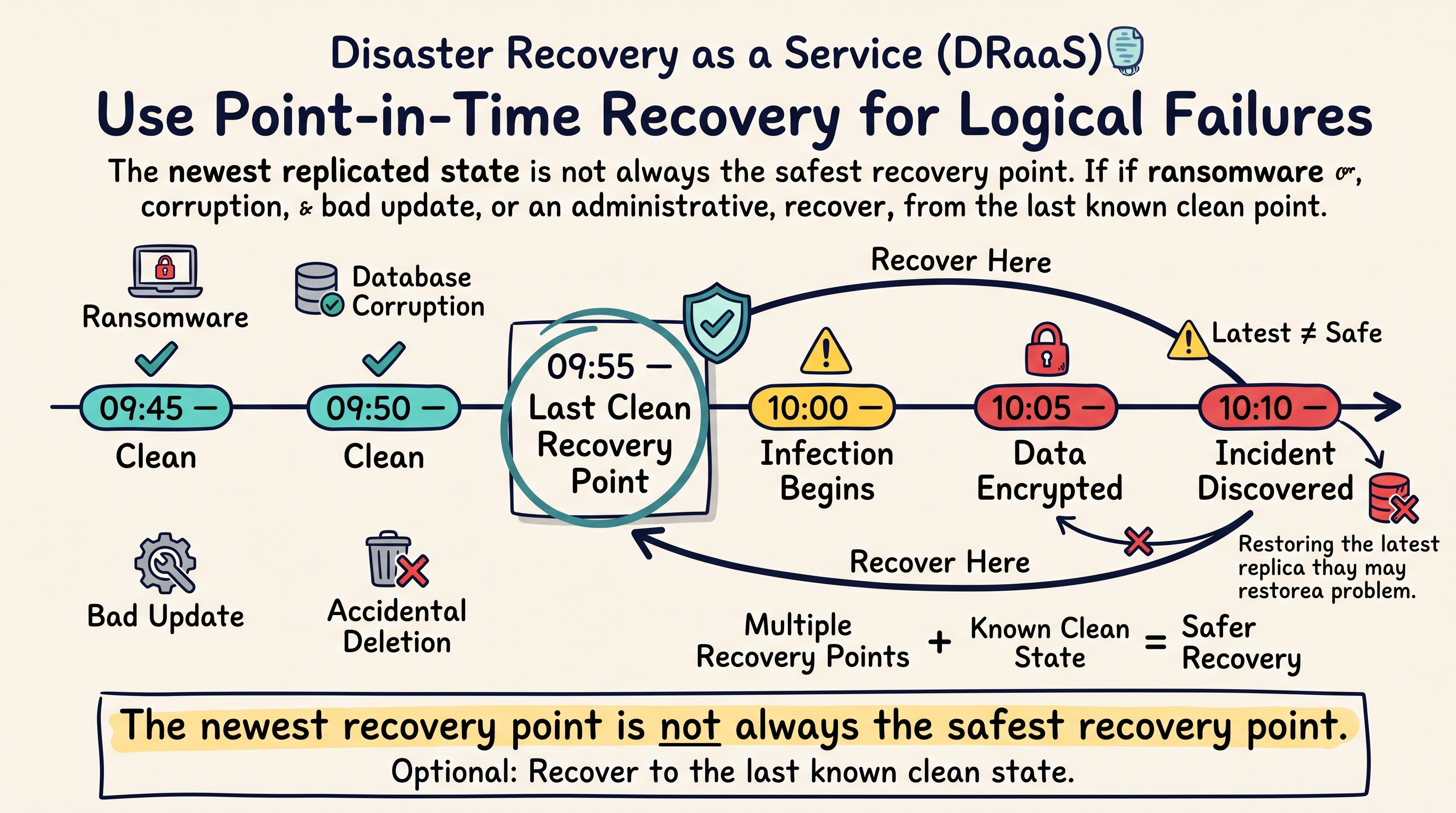
Replication can faithfully copy a bad state. That is why recovery history matters.
Ransomware may replicate encrypted blocks to the recovery site.
Bad application updates can corrupt an otherwise healthy VM.
Database changes may need to be rolled back to an earlier state.
Multiple recovery points provide options beyond simply restoring the latest replica.
The newest recovery point is not always the safest recovery point.
10. Build Runbooks Before the Incident#
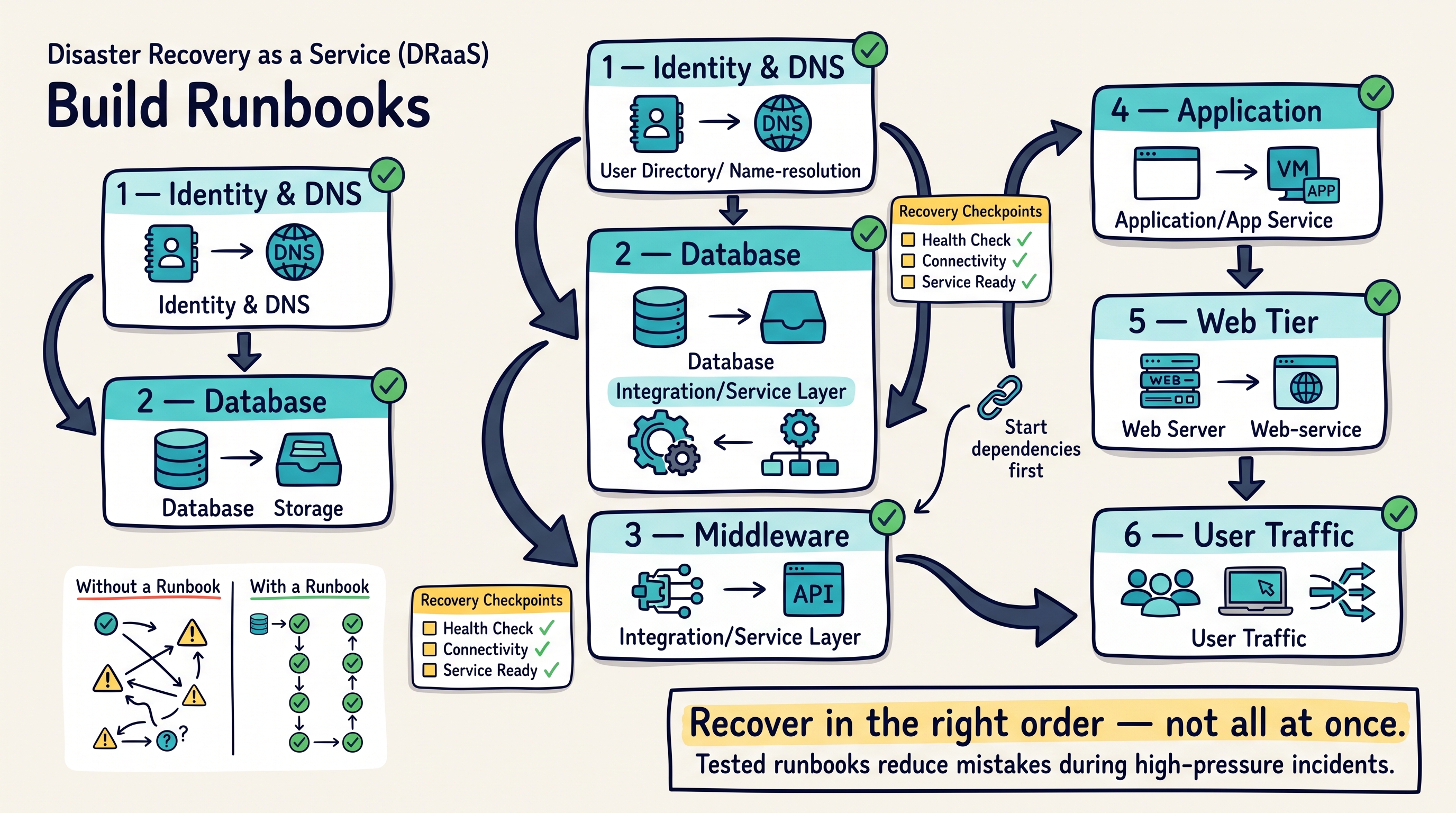
A good runbook turns recovery into a sequence instead of a guessing exercise.
Identity / DNS
      ↓
Database
      ↓
Middleware
      ↓
Application
      ↓
Web / User Access
Activate recovery networks.
Start identity, DNS, and infrastructure services.
Start databases before dependent applications.
Apply routing and DNS changes.
Run health checks before redirecting users.
Document ownership, approvals, and escalation paths.
During an outage, a tested runbook is more valuable than an improvised plan.
11. Protect the Recovery Environment#
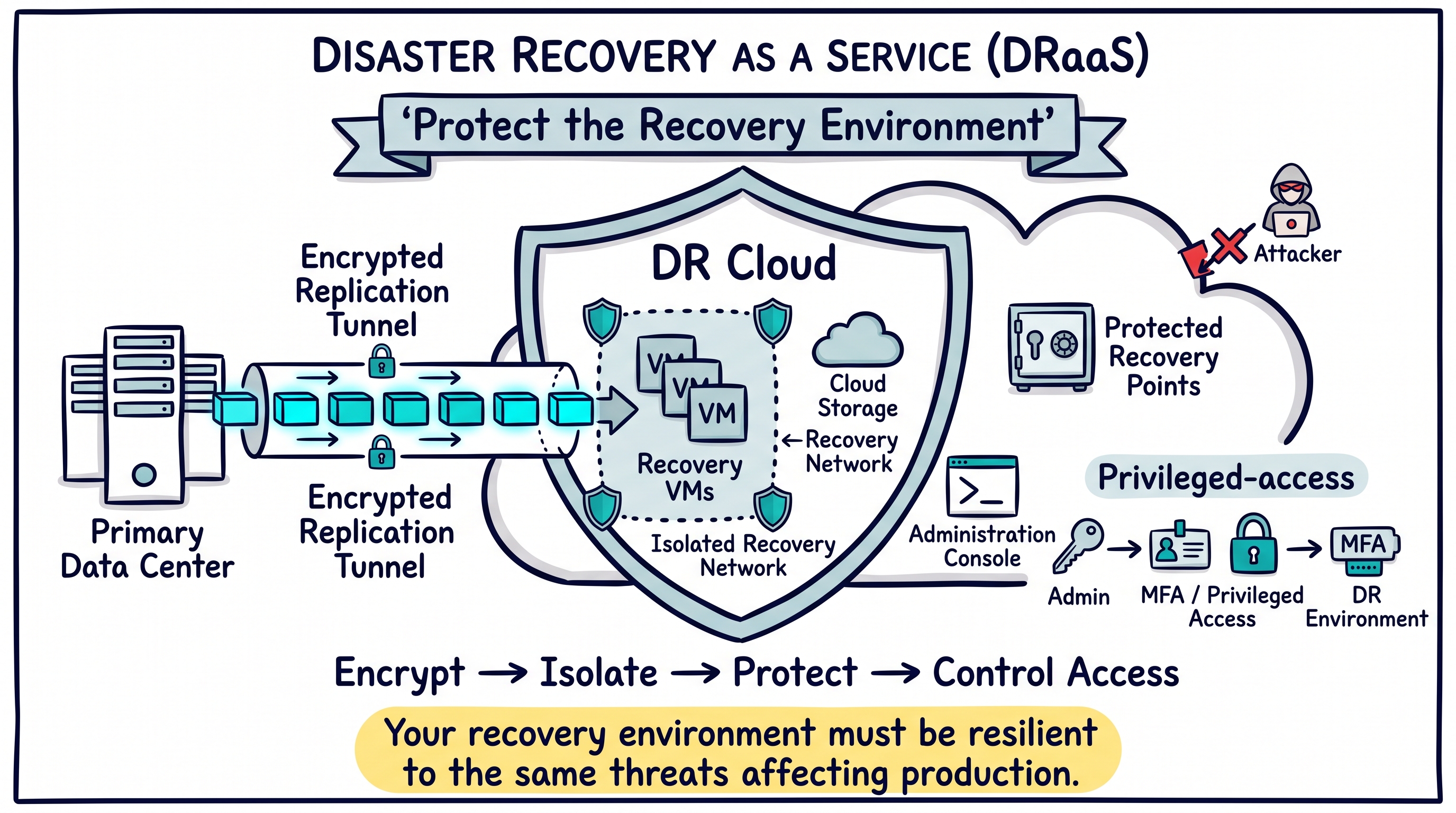
The DR environment should not become the easier path for an attacker.
Use encryption in transit and at rest.
Separate recovery administration from normal production access where practical.
Protect recovery points from unauthorized deletion.
Use isolated networks for cyber-recovery validation.
Review firewall, identity, and privileged-access controls at the DR site.
A recovery platform must be resilient to the same threats affecting production.
12. Test Recovery Without Disrupting Production#
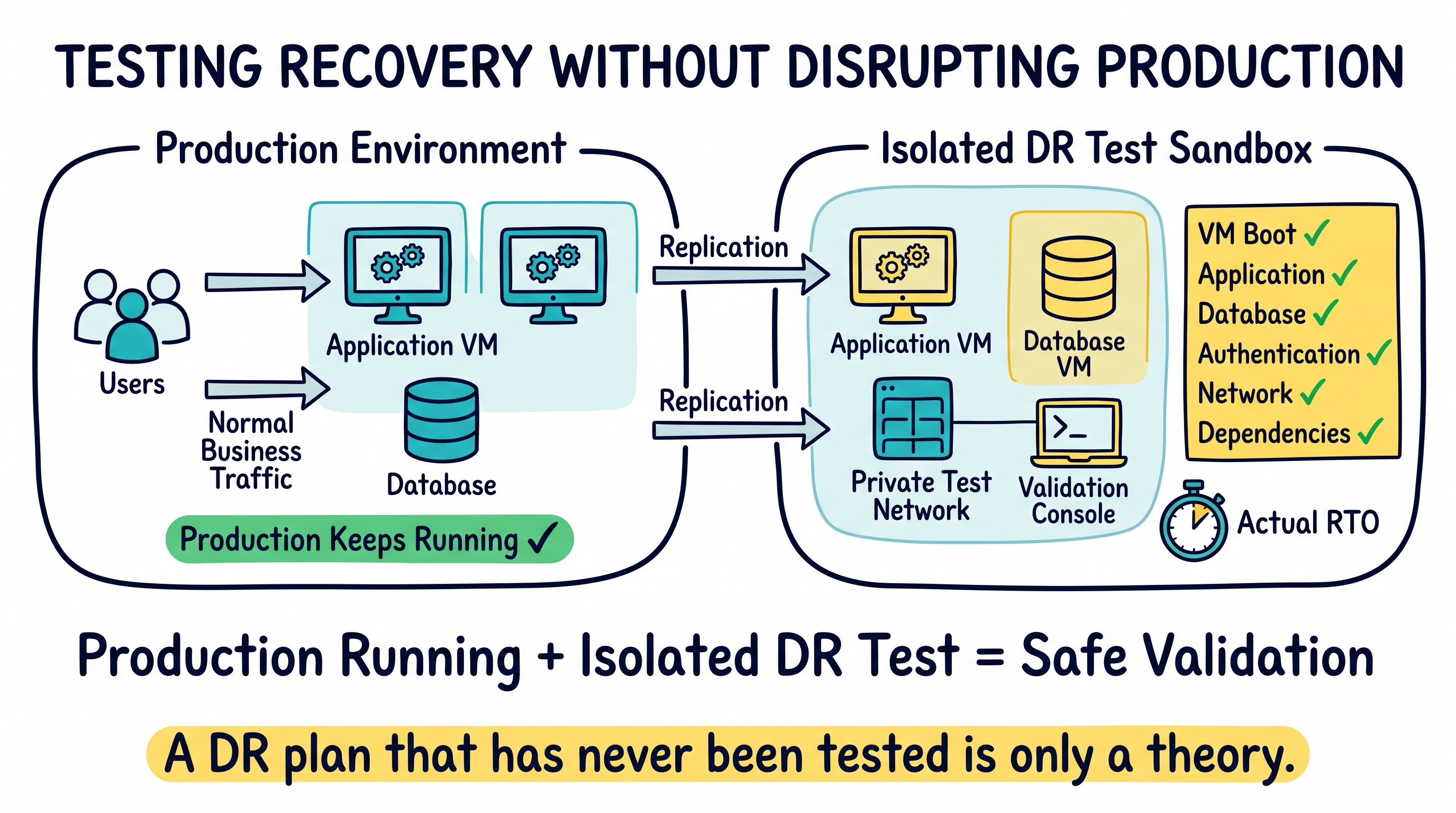
Testing should prove that workloads can recover without requiring a real outage.
Start replicas in isolated test networks.
Validate VM boot and application startup.
Check database consistency and authentication.
Test network dependencies and external integrations.
Measure actual recovery time against the documented RTO.
A disaster recovery plan that has never been tested is only a theory.
13. Plan Failback Before You Fail Over#
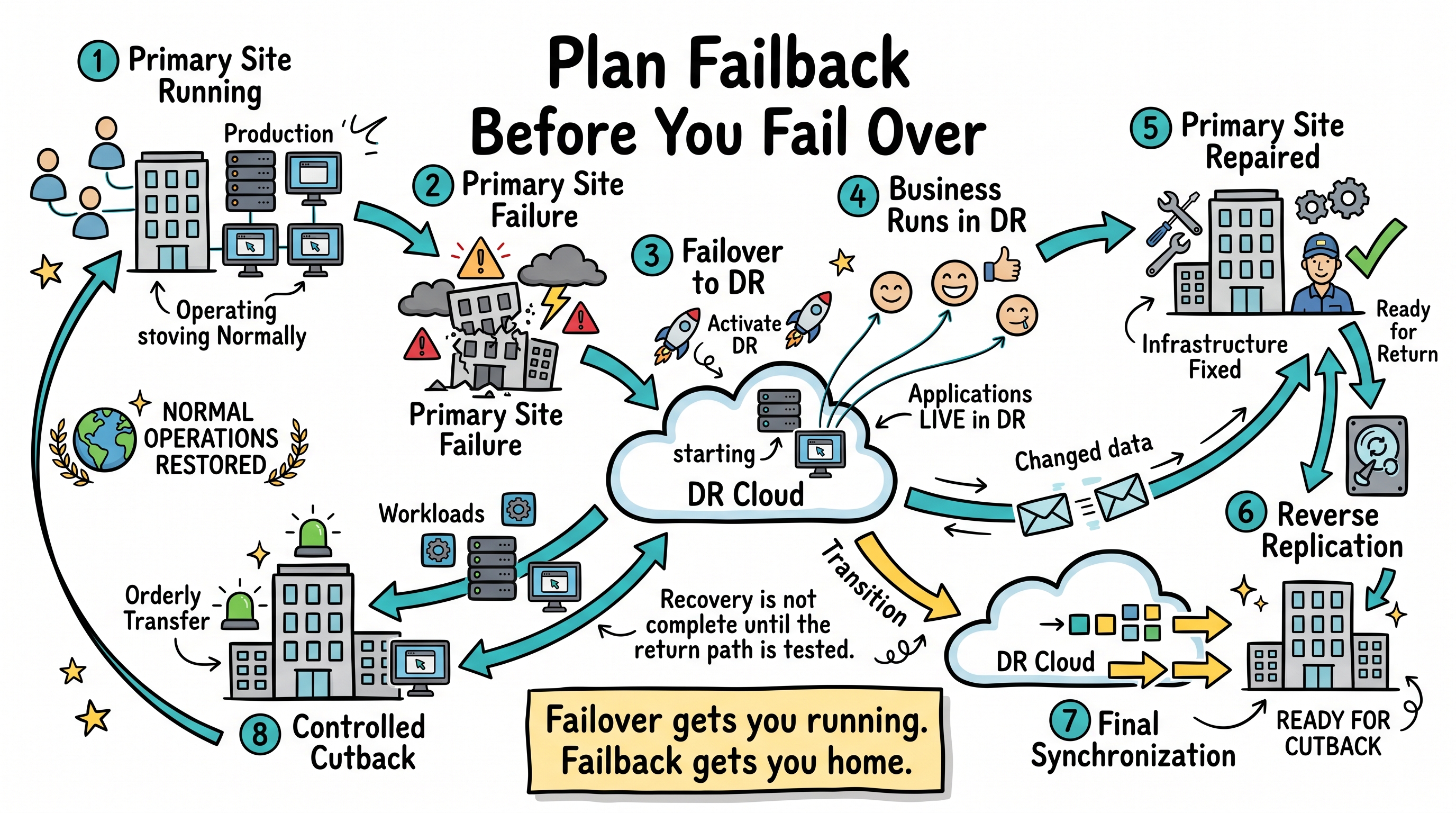
Failover is only half of the process. Eventually the organization must return to the repaired primary environment.
Primary Site Fails
        ↓
DR Site Activated
        ↓
Business Runs in DR
        ↓
Primary Site Repaired
        ↓
Changes Replicated Back
        ↓
Controlled Cutback
Repair and validate the primary site.
Reverse or re-establish replication.
Synchronize changes created while running in DR.
Schedule a controlled cutback window.
Restore normal routing, DNS, and operational monitoring.
Recovery is not complete until the business can safely return to its normal operating model.
14. Tier Workloads by Criticality#
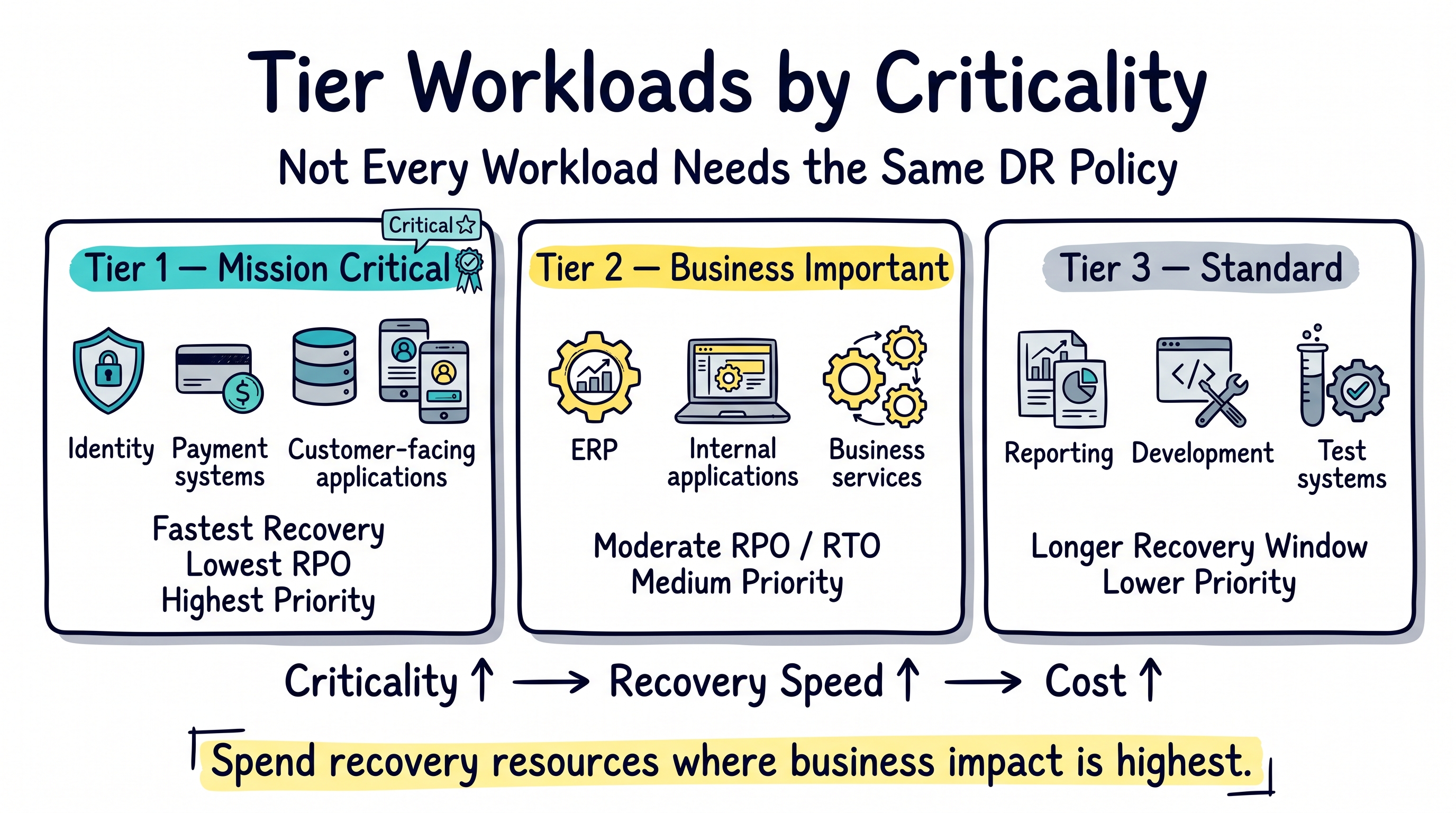
Trying to give every system the same RTO and RPO usually wastes money or under-protects critical services.
Tier 1: identity, core databases, payment, transaction, and customer-facing services.
Tier 2: important business applications and internal services.
Tier 3: reporting, development, test, and lower-priority systems.
Assign different RPO, RTO, retention, and compute policies to each tier.
Not every workload needs the same recovery speed or the same DR cost.
15. Measure, Review, and Improve#
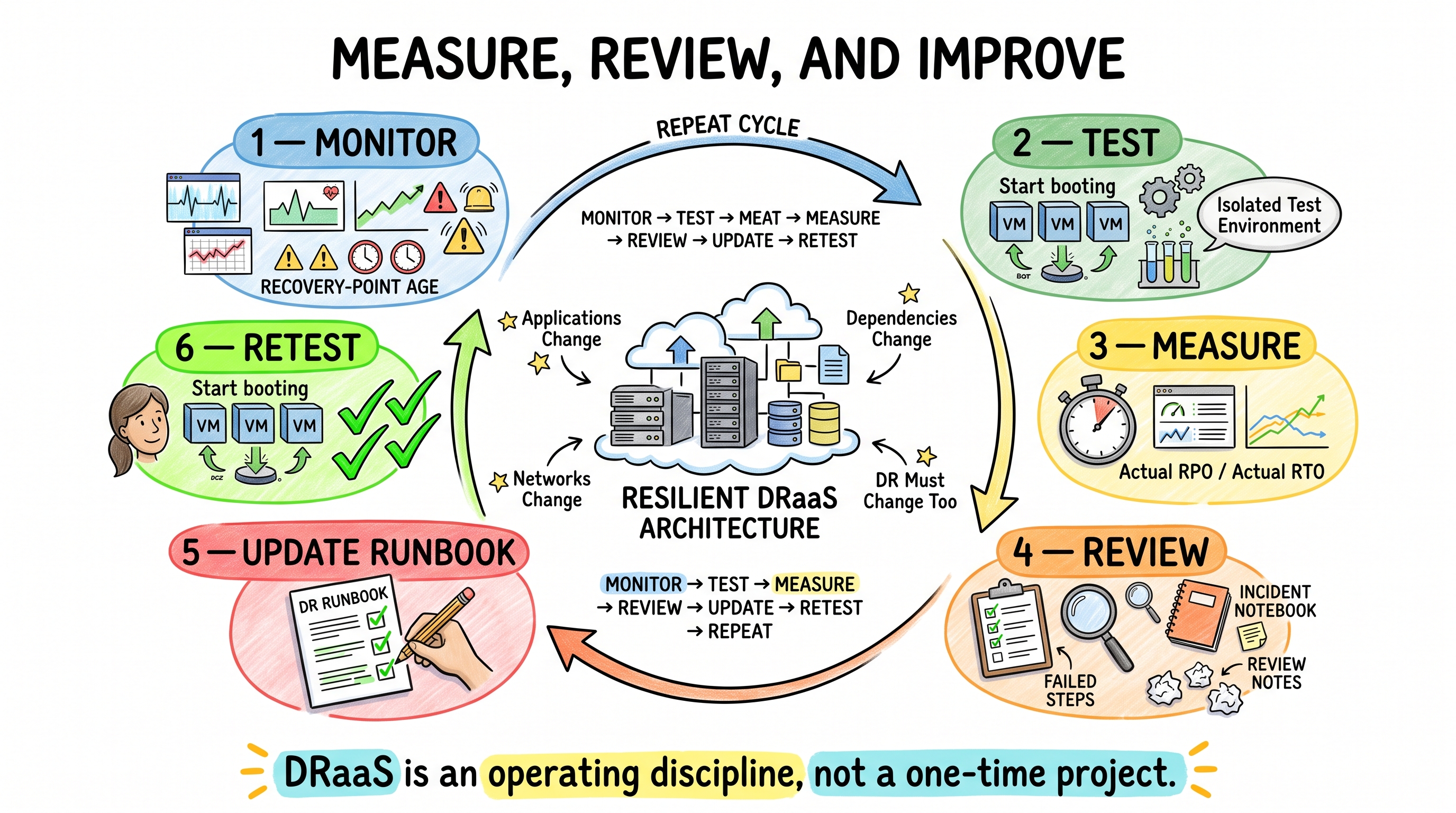
Applications, networks, dependencies, and business priorities change. The DR plan must change with them.
Track replication health and recovery-point age.
Measure actual test RTO and compare it with the target.
Review failed steps and manual dependencies.
Update runbooks after infrastructure or application changes.
Repeat tests regularly as the environment evolves.
DRaaS is an operating discipline, not a one-time deployment.
The Best DRaaS Workflow#
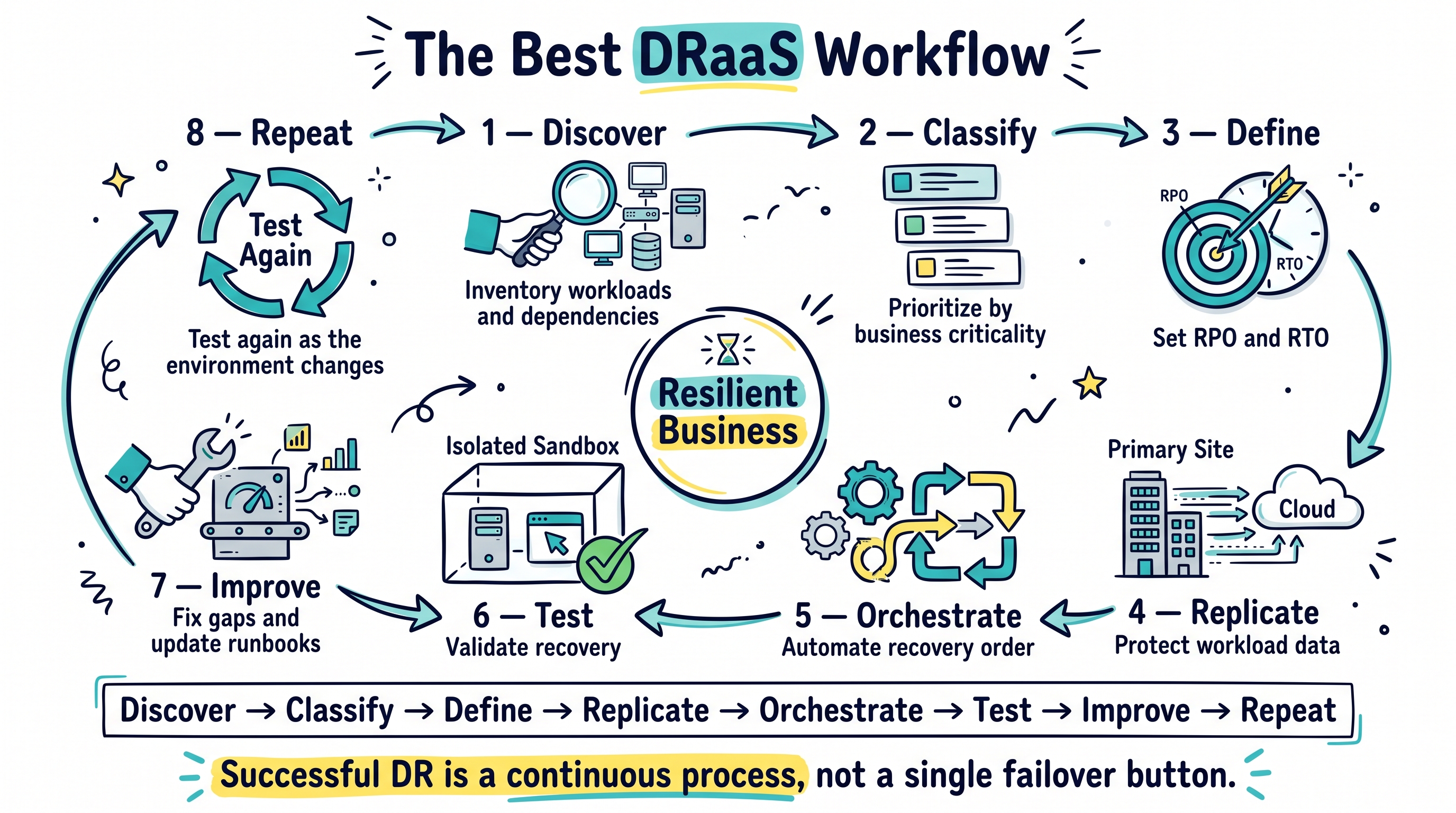
A strong disaster recovery workflow can be surprisingly simple:
Step 1 — Discover#
Inventory workloads, dependencies, networks, owners, and business impact.
Step 2 — Classify#
Group workloads into recovery tiers based on criticality.
Step 3 — Define#
Assign RPO and RTO targets to each tier.
Step 4 — Replicate#
Select the replication model, target site, recovery-point policy, and bandwidth design.
Step 5 — Orchestrate#
Build runbooks for startup order, networking, validation, communications, and approvals.
Step 6 — Test#
Recover workloads in isolated networks and measure actual recovery time.
Step 7 — Improve#
Fix failed steps, remove manual dependencies, and update documentation.
Step 8 — Repeat#
Retest after meaningful infrastructure or application changes.
The Biggest Secret: DRaaS Is Not the Product#
A common mistake is to think that buying a replication platform automatically creates a disaster recovery strategy.
It does not.
The platform is only one part of the system.
The real capability is knowing what to recover, in what order, to which network, from which recovery point, within what time, and how to prove that it works.
The technology can automate replication and failover.
Your organization still has to define the operating model.
Final Thoughts#
Modern DRaaS makes enterprise recovery more flexible by combining continuous replication, cloud infrastructure, recovery-point management, and orchestration.
But the strongest results do not come from deploying replication and hoping for the best.
They come from a disciplined process:
Know the business impact.
Define RPO and RTO.
Protect against multiple failure types.
Use backup and replication together.
Design networking and dependencies.
Automate the runbook.
Test regularly.
Plan failback.
Keep improving.
The goal is not simply to have a second copy of your workloads.
The goal is to know that the business can recover when the primary environment is no longer available.
Ready to assess your disaster recovery strategy?
Rate this article
Be the first to rate this article
Comments & Discussion0
Related articles
Demystifying Container as a Service (CaaS): A Complete Guide to Modern Cloud Architecture  DevOps & Containers
Demystifying Container as a Service (CaaS): A Complete Guide to Modern Cloud Architecture
In the fast-paced world of software development, engineering teams are constantly searching for ways to build, ship, and scale applications faster wit...
Mohammed Qaid