CONTAINER AS A SERVICE
What it is, how a container actually gets from your laptop to the internet, and when to reach for it instead of a VM or a serverless function.
01 / DEFINITION
What CaaS Actually Removes
Container as a Service (CaaS) is a cloud model where the provider runs the container orchestration layer — the scheduler, the cluster, the nodes — and you hand over an image and a set of rules.
You still package your application the normal way, into a container image built from a Dockerfile. The difference from running your own cluster is what happens next: instead of provisioning servers, installing a container runtime, and standing up something like Kubernetes yourself, you push the image to a managed platform and describe what you want — how many replicas, how much CPU and memory, which port to expose. The platform finds the capacity, places the containers, restarts them when they crash, and scales them up or down.
The clearest way to see what's being handed off is to line CaaS up against the two models on either side of it.
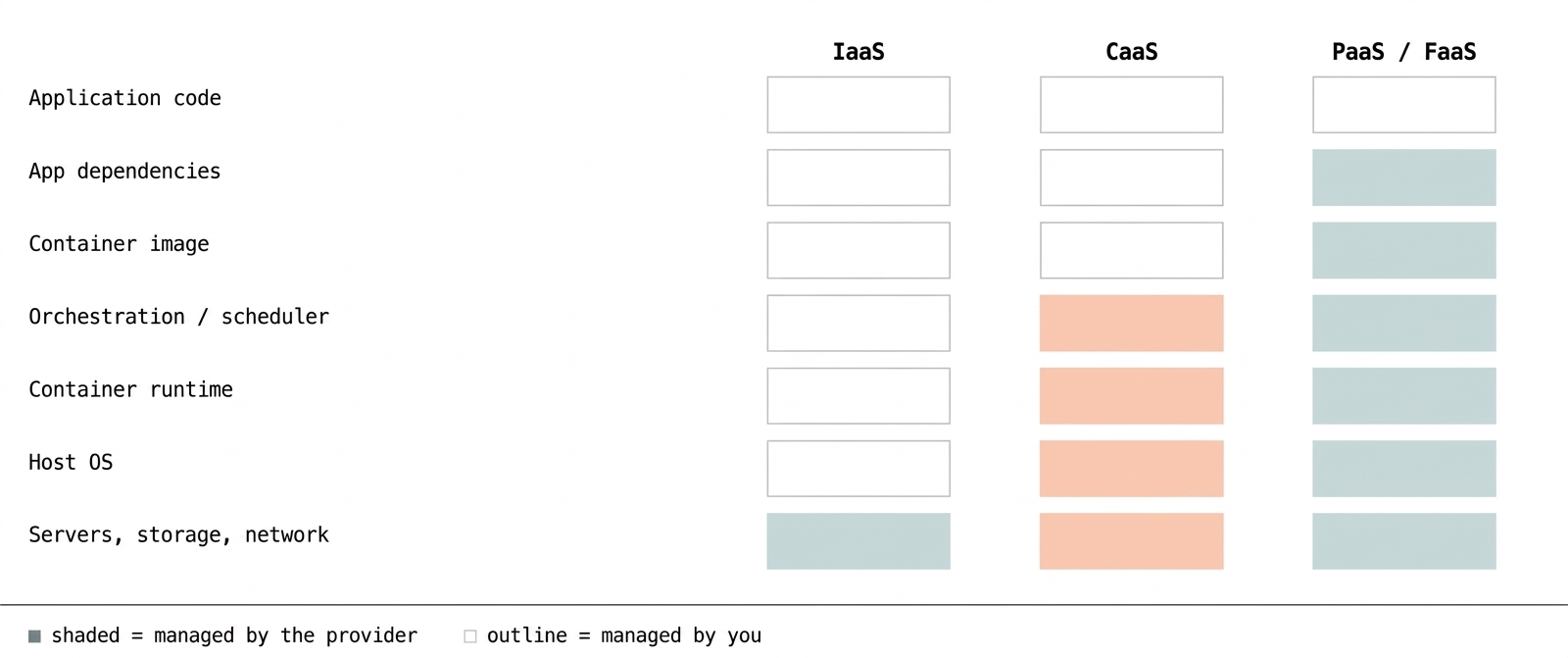
Fig. 1 — Moving from IaaS to CaaS to PaaS/FaaS, the provider absorbs progressively more of the stack. CaaS is the line drawn just above the container runtime: you own the image, the platform owns everything needed to run it.
02 / FOUNDATIONS
Why Containers, Not VMs
CaaS only makes sense once containers do, so it's worth being precise about what a container shares with the machine it runs on. A virtual machine virtualizes hardware: each VM carries its own full guest operating system, so three VMs on one host means three OS kernels running side by side. A container virtualizes the operating system instead — every container on a host shares that host's kernel, and packages only the application and its dependencies on top of it.
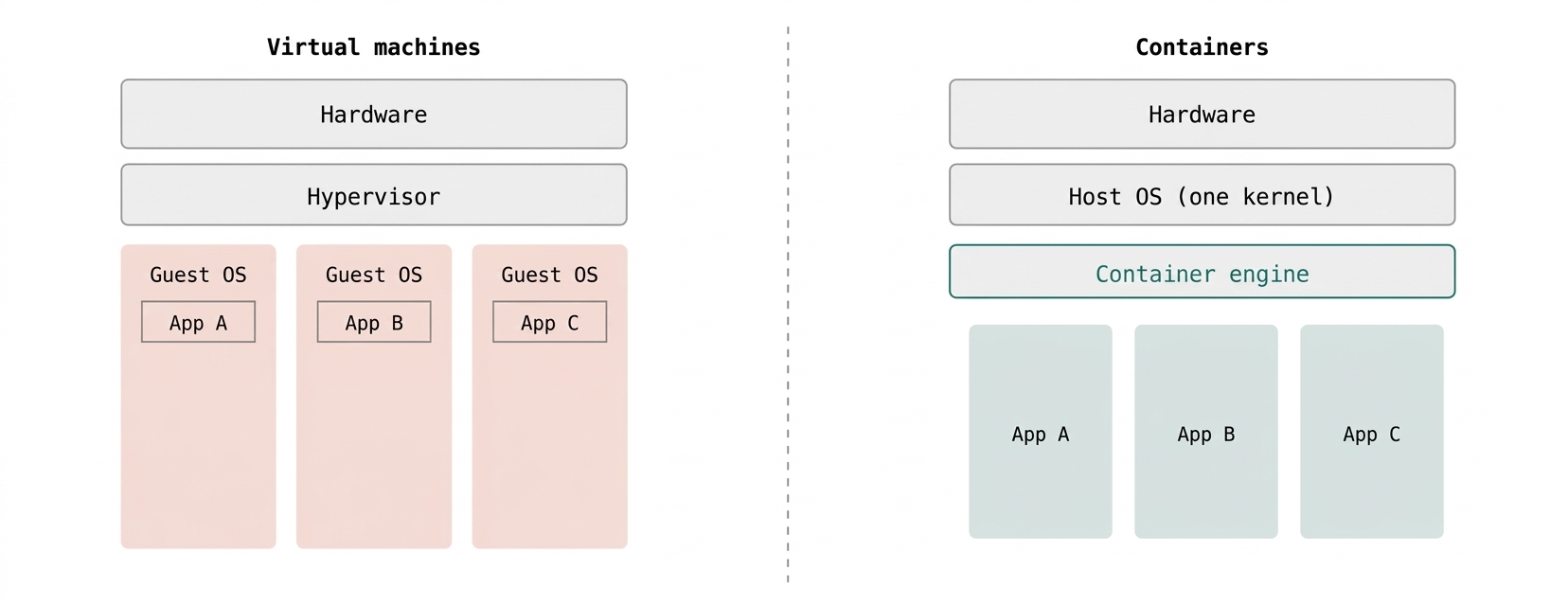
Fig. 2 — Three VMs mean three guest kernels; three containers share one. That's the difference a CaaS platform is scheduling at scale — lighter units it can start, stop, and move in seconds rather than minutes.
03 / MECHANISM
From Build To Running Traffic
The workflow is the same five steps whether the platform is AWS Fargate, Google Cloud Run, or Azure Container Apps — only who operates each step changes.
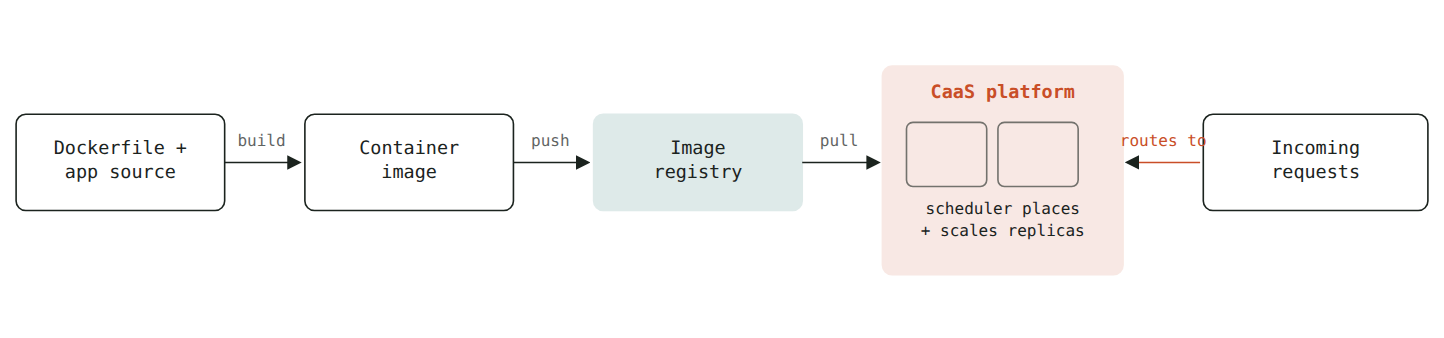
Fig. 3 — Everything left of the platform boundary is yours: the code and the image. Everything inside it — placement, health checks, restarts, routing — is what "as a service" is paying for.
Where platforms differ is the unit you describe: Cloud Run and Fargate let you hand over a single container and a concurrency setting; Azure Container Apps and EKS/GKE-based CaaS offerings expose more Kubernetes concepts — pods, services, ingress rules — while still running the control plane for you.
04 / ELASTICITY
What “Managed Scaling” Is Doing
The orchestrator watches a signal — usually CPU, memory, or requests per instance — against thresholds you set, then adds or removes running containers to keep it inside them. This is the mechanism behind "scales automatically," and it's worth seeing as a loop, not a switch.
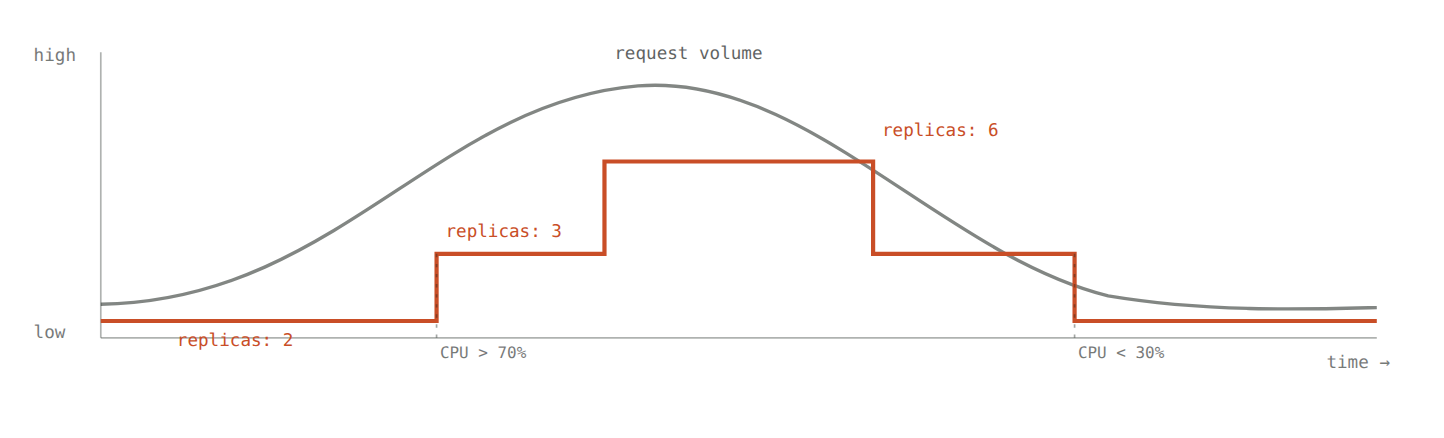
Fig. 4 — The orange step line is the thing you're actually paying for: replicas rise when a threshold is crossed on the way up, and are reclaimed on the way down — usually with a short delay, so a brief spike doesn't cause a scaling loop.
05 / TRADE-OFF
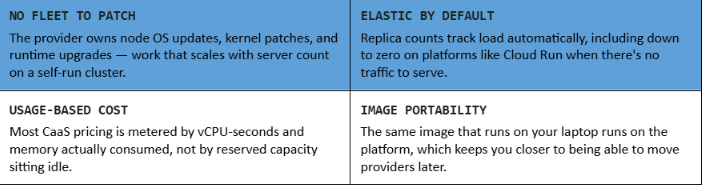
What You Get For Giving Up The Cluster
06 / LANDSCAPE
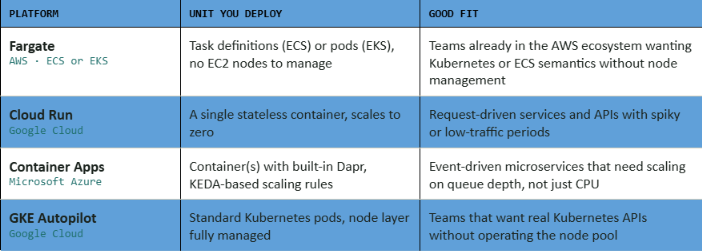
Where To Run One
These differ mainly in how much of the underlying orchestrator they expose to you.
07 / JUDGMENT CALL
When CaaS Is The Wrong Layer
USE IAAS You need OS-level control — custom kernel modules, GPU driver versions the platform doesn't offer, or licensing that requires dedicated hosts.
USE FAAS Work is short and event-triggered — a function that runs for milliseconds in response to a single event often costs and operates more simply than a container built to stay warm.
USE CAAS You want portability and control over the runtime — your own base image, dependencies, and startup behavior — without owning the machines underneath it.
WATCH OUT Cold starts and cross-service networking still need attention: a container scaled to zero takes real seconds to serve its first request, and service-to-service calls across a managed mesh add latency and a new failure mode to reason about.
Rate this article
Be the first to rate this article
Comments & Discussion0
Related articles
Demystifying Container as a Service (CaaS): A Complete Guide to Modern Cloud Architecture  DevOps & Containers
Demystifying Container as a Service (CaaS): A Complete Guide to Modern Cloud Architecture
In the fast-paced world of software development, engineering teams are constantly searching for ways to build, ship, and scale applications faster wit...
Mohammed Qaid