Containers as a Service (CaaS): The Practical Guide to Running Apps in the Cloud Without the Server Headaches

How many times have you finished building a feature, tested it thoroughly on your local machine where everything ran flawlessly, only to hit a wall the moment you deployed to production?
A missing system dependency, mismatched Node or Python versions, conflicting port bindings, or an unexpected traffic spike that brought the server down within minutes!
Virtually every developer has lived through this scenario. At first, Docker Containers solved half the problem: they bundled the application alongside all its dependencies and runtime files into a single, predictable box that behaves identically anywhere.
However, running a single container on your laptop for development is fun and easy. Operating, monitoring, load-balancing, and safely upgrading a fleet of containers in production for real users is an engineering discipline that usually demands a dedicated DevOps team.
This is where Containers as a Service (CaaS) steps in. In this guide, we break down what CaaS really does under the hood, how it compares to traditional cloud hosting models, and why it represents the smartest operational model for modern web apps and APIs.
1. The Shared Responsibility Spectrum: Where Does CaaS Fit?#
Cloud hosting options differ primarily in operational boundaries: what you manage as an application engineer versus what the cloud platform handles automatically.
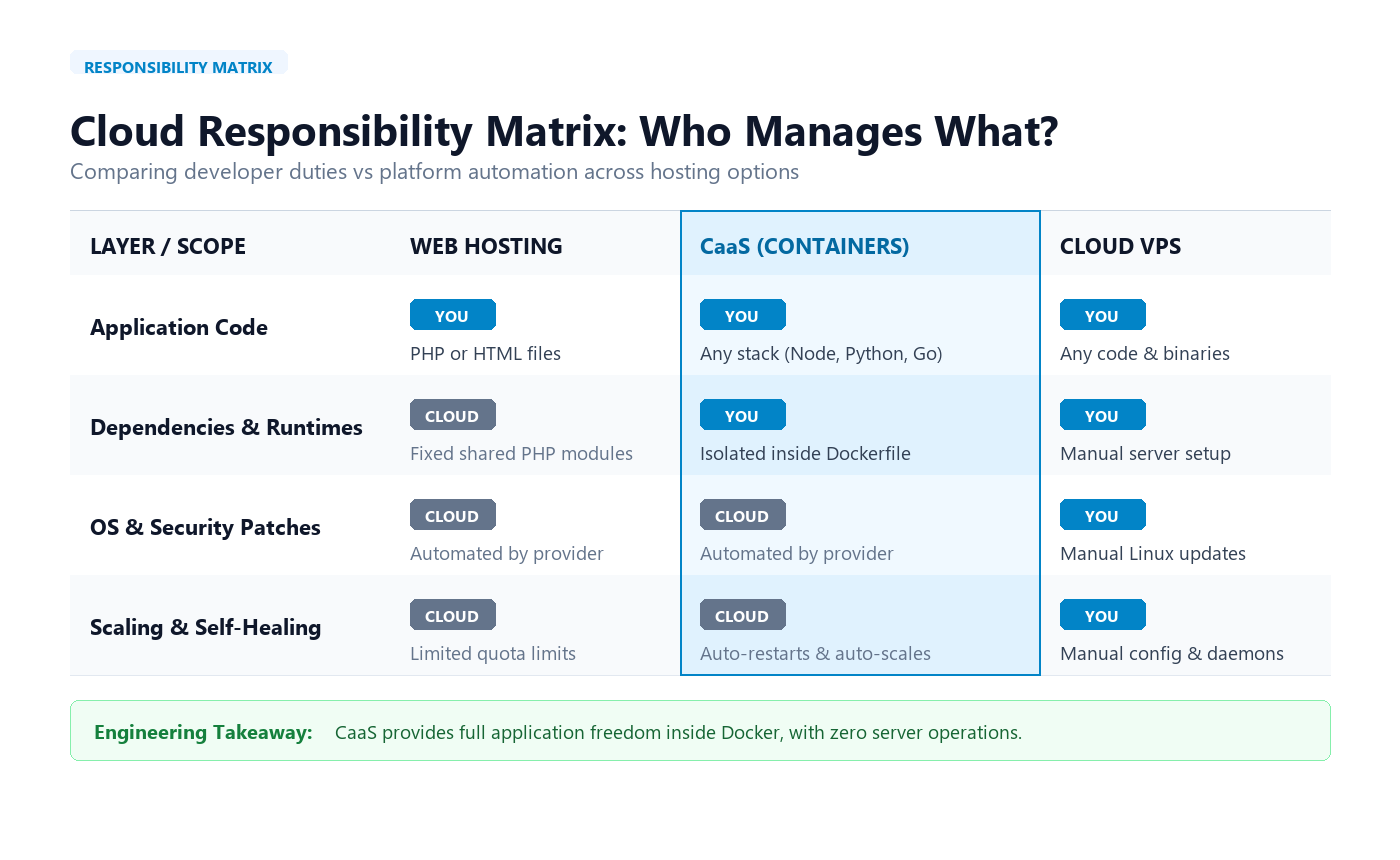
Figure 1: Operational boundaries across Cloud Web Hosting, CaaS, and Cloud VPS
When we examine modern cloud offerings like those provided by Sohobcom, we can break down cloud hosting into three distinct architectural models:
Cloud Web Hosting: You manage application code only (PHP/HTML). The cloud provider handles physical hardware, OS, and web servers. (Restricted runtime: best for simple landing pages and WordPress).
Containers as a Service: You manage application code and Dockerfile dependencies. The cloud provider automates OS patching, networking, automated SSL certificates, health checks, and elastic autoscaling. (The optimal balance: total runtime freedom with zero sysadmin overhead).
Cloud VPS / VDC: You manage the entire OS, Linux kernel patches, security firewalls, and daemons. The cloud provider only supplies virtualization. (Full root control: best for complex databases, but requires continuous maintenance).
Architectural rule: CaaS offloads host maintenance. Instead of spending hours patching Linux kernels, configuring firewall tables, or building custom ingress proxies, you define your runtime in a Dockerfile and let the platform handle process health and routing.
2. Under the Hood: How CaaS Works Behind the Scenes#
At its core, a CaaS platform provides autonomous runtime orchestration—continuously supervising your application processes without manual sysadmin intervention:
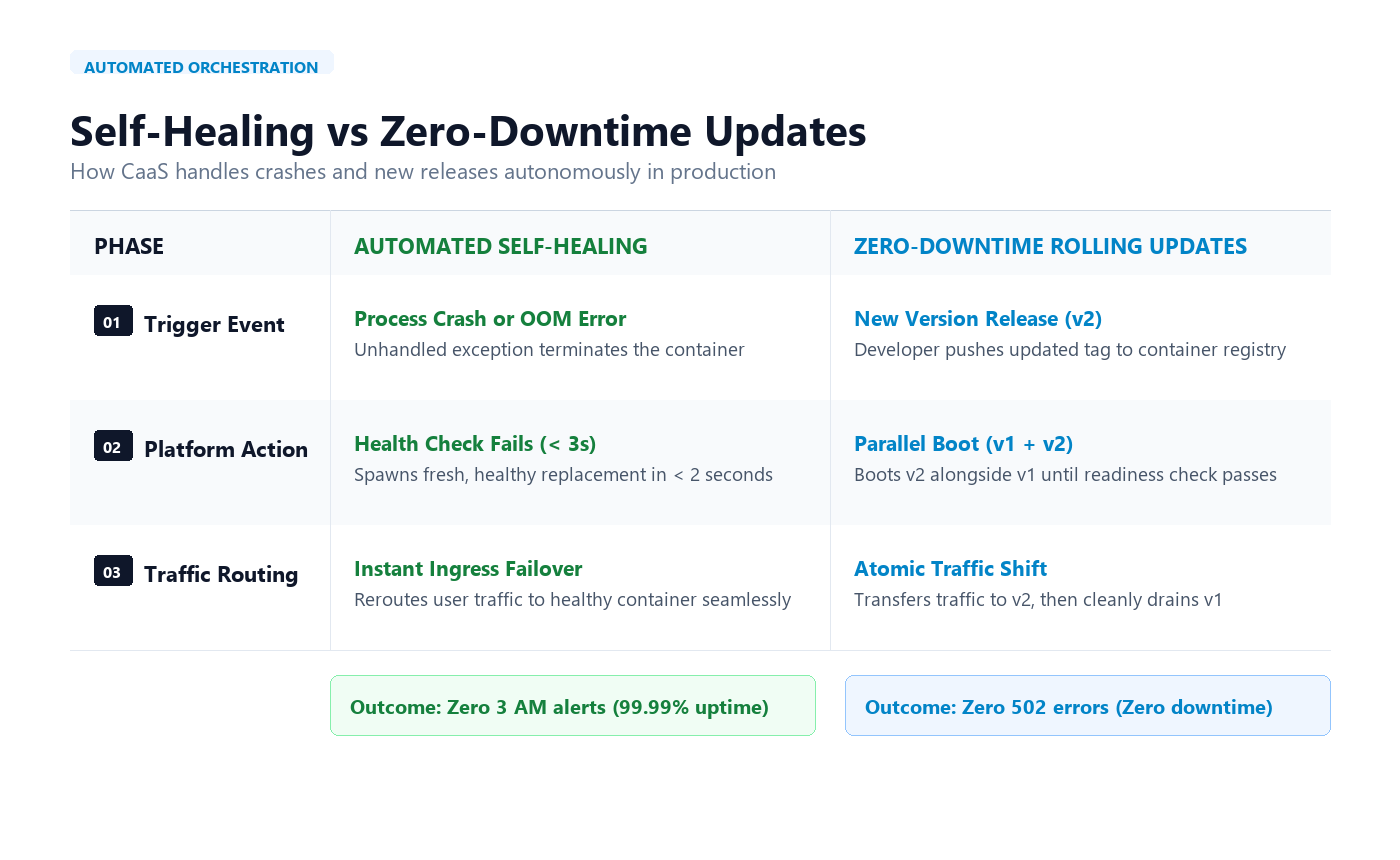
Figure 2: Lifecycle operations comparing Automated Self-Healing and Zero-Downtime Rolling Updates
A) Automated Self-Healing#
What happens if an unexpected code bug triggers an Out-Of-Memory (OOM) crash or unhandled exception at 3:00 AM?
On a traditional VPS, the web server crashes and stays dead until an engineer wakes up, logs in via SSH, and manually reboots the process.
In a CaaS environment, the platform continuously polls your application's
/healthendpoint. As soon as a failure is detected, the orchestrator terminates the faulty instance and provisions a fresh, healthy container in under two seconds, redirecting incoming traffic with zero dropped connections.
B) Zero-Downtime Rolling Updates#
When you push a new release (v2), how do you deploy it to users without triggering the dreaded 502 Bad Gateway downtime error?
The orchestrator does not stop the active version (v1) immediately.
Instead, it boots the new v2 container in the background and runs health checks to ensure it is warm and fully operational.
Only once v2 passes all readiness gates does the ingress router smoothly transfer incoming traffic to v2, gracefully terminating the old v1 instances.
3. Hands-On: Preparing Your App for CaaS in 3 Simple Steps#
Getting an application ready for CaaS does not require over-engineering. All it takes is packaging your code into an efficient container image and publishing it:
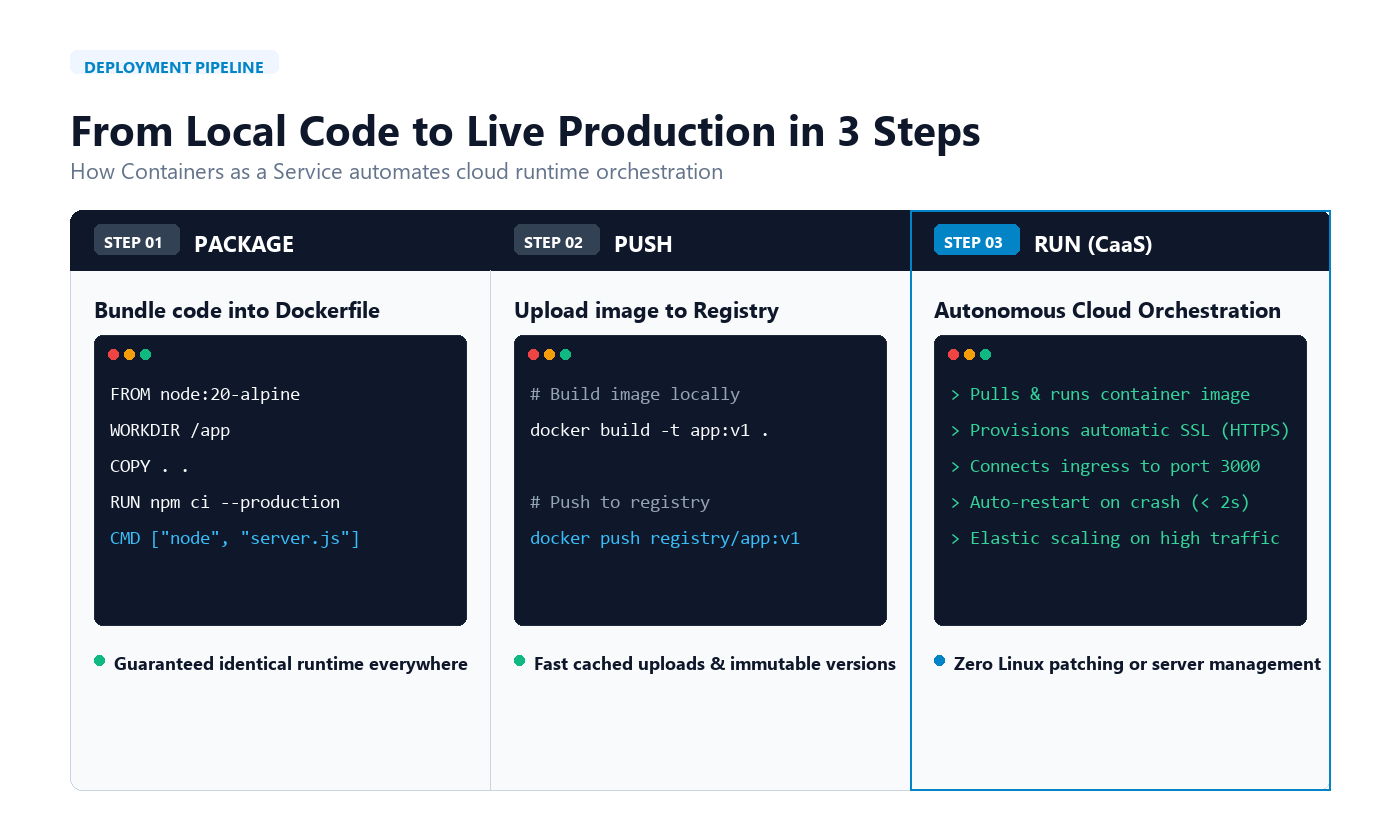
Figure 3: The 3-stage delivery pipeline from Dockerfile build to live CaaS runtime
Step 1: Craft a Clean Multi-Stage Dockerfile#
Here is a production-grade Dockerfile for a Node.js application, using a multi-stage build to keep the image lightweight and free of unnecessary build tools:
# Stage 1: Build the application
FROM node:20-alpine AS builder
WORKDIR /app

# Copy dependency definitions and install
COPY package*.json ./
RUN npm ci

# Copy source code and build
COPY . .
RUN npm run build && npm prune --production

# Stage 2: Lean and secure production image
FROM node:20-alpine AS runner
WORKDIR /app

# Run as non-root user for security
USER node

# Copy only production artifacts from builder
COPY --from=builder /app/package*.json ./
COPY --from=builder /app/node_modules ./node_modules
COPY --from=builder /app/dist ./dist

# Application port and healthcheck
EXPOSE 3000
HEALTHCHECK --interval=30s --timeout=3s \
  CMD wget -qO- http://localhost:3000/health || exit 1

# Start the application
CMD ["node", "dist/main.js"]
Step 2: Push Image to Your Private Registry#
Build your container image locally and push it to your registry using standard Docker commands:
# Build container image
docker build -t your-app:v1 .

# Tag & push to your container registry
docker tag your-app:v1 registry.yourcompany.io/your-app:v1
docker push registry.yourcompany.io/your-app:v1
Step 3: Instant Live Deployment#
Once you link the CaaS platform to your registry and configure your target port (e.g., 3000):
The platform pulls the image and launches your containers within seconds.
An automated SSL certificate (HTTPS) is issued for your custom domain.
The orchestrator manages automated health checks, self-healing, and elastic auto-scaling as traffic grows.
4. What About Databases and Files?#
There is one fundamental architectural rule to keep in mind when working with containers:
"Containers are designed to be disposable and easily replaced. Never trap your persistent data inside them."
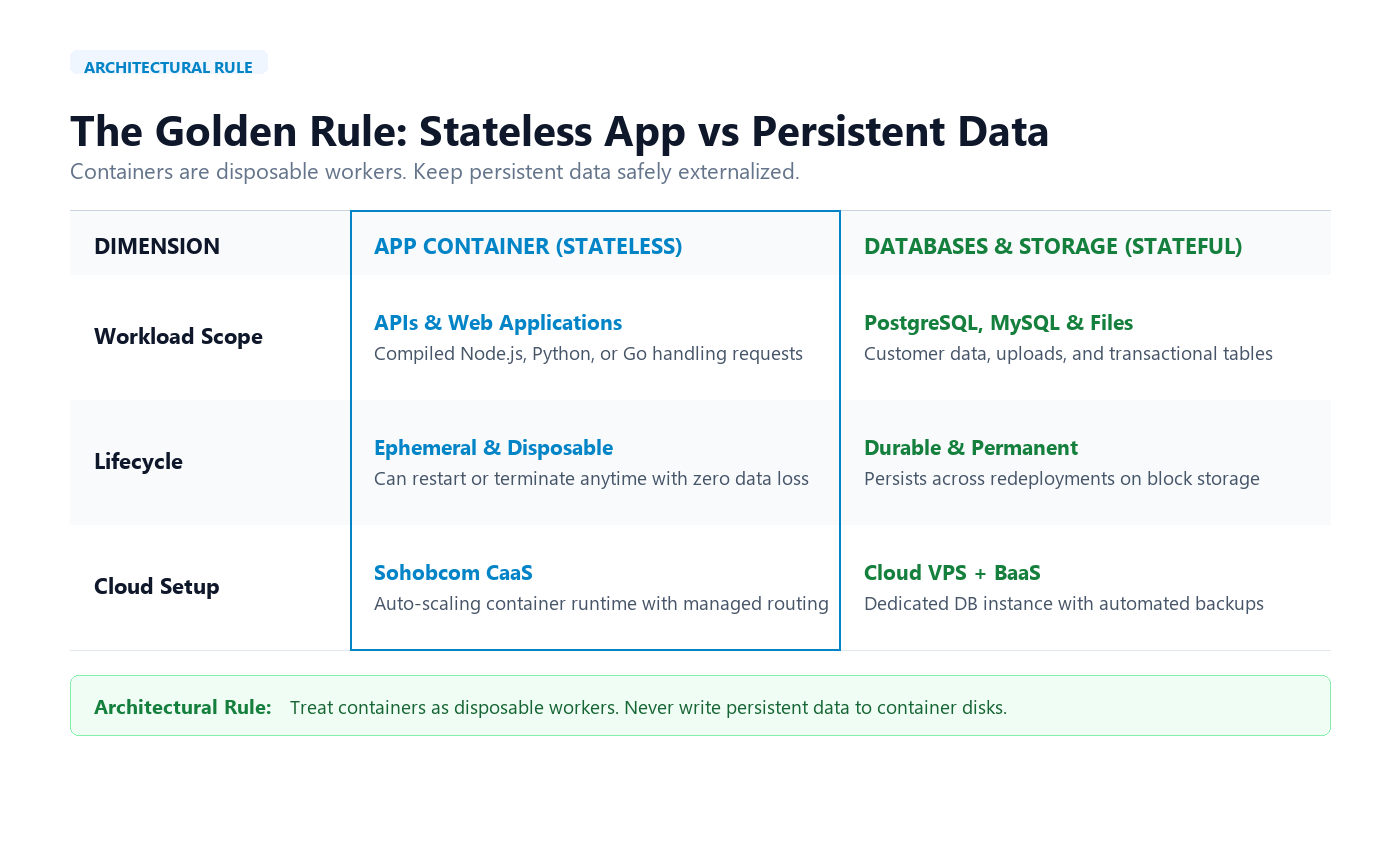
Figure 4: Decoupling disposable application runtimes from persistent databases and storage
Containers excel at executing application logic (APIs, web servers, background workers) because they are inherently stateless. For persistent data, adhere to these practices:
Databases (PostgreSQL / MySQL): Run them on dedicated persistent infrastructure such as a Cloud VPS, and configure automated snapshot schedules using BaaS (Backup as a Service).
User Uploads & Static Assets: Store files in an S3-compatible Object Storage bucket rather than writing them to the container’s local filesystem.
By decoupling state from computation, you can deploy updates, destroy instances, or scale horizontally with 100% confidence that your customer data remains untouched and secure.
Conclusion#
Adopting Containers as a Service (CaaS) bridges the gap between local code and production workloads. It eliminates the friction of manual server provisioning while preserving complete runtime control.
For teams building modern APIs, background workers, and web services, CaaS delivers the ideal balance: full runtime flexibility in your container, with zero infrastructure toil.
Rate this article
Be the first to rate this article
Comments & Discussion0
Related articles
Containers-as-a-Service - CaaS  DevOps & Containers
Containers-as-a-Service - CaaS
Containers as a Service (CaaS) is an advanced cloud computing model. This technology enables developers and operations teams to deploy and manage containerized applications using popular build tools such as Docker. It also relies on advanced orchestration and automation engines such as Kubernetes to manage these containers and their clusters, and to scale them automatically as needed. Thus, the platform relieves organizations of the complexities of managing physical infrastructure, enabling them to focus entirely on software development efficiently and securely.
رضا المعمري