cPanel Explained
What Is cPanel, Really?
cPanel is a commercial, Linux-based web hosting control panel that provides a graphical layer over the command-line administration of a web server. It was first released in 1996 and, together with its server-administration counterpart WHM (WebHost Manager), has become the de facto standard control panel across the shared, reseller, and VPS hosting industry. If you have ever logged into a hosting account to upload files over a browser, create an email address, or install WordPress with one click, there is a good chance cPanel was doing the work behind the scenes.
Technically, cPanel is not a server itself — it is an orchestration and configuration-management layer that sits on top of standard Linux services: Apache or NGINX for HTTP, Exim (or Dovecot for IMAP/POP3) for mail, MySQL or MariaDB for databases, BIND or PowerDNS for DNS, and cron for scheduled tasks. cPanel's job is to expose safe, permissioned, auditable controls over all of these subsystems through a web UI, a set of APIs (UAPI, cPanel API 2, and the older API 1), and a command-line toolkit, without requiring the end user to touch a shell.
In short: WHM manages the server. cPanel manages an individual hosting account on that server. They are two faces of the same product, built for two different audiences.
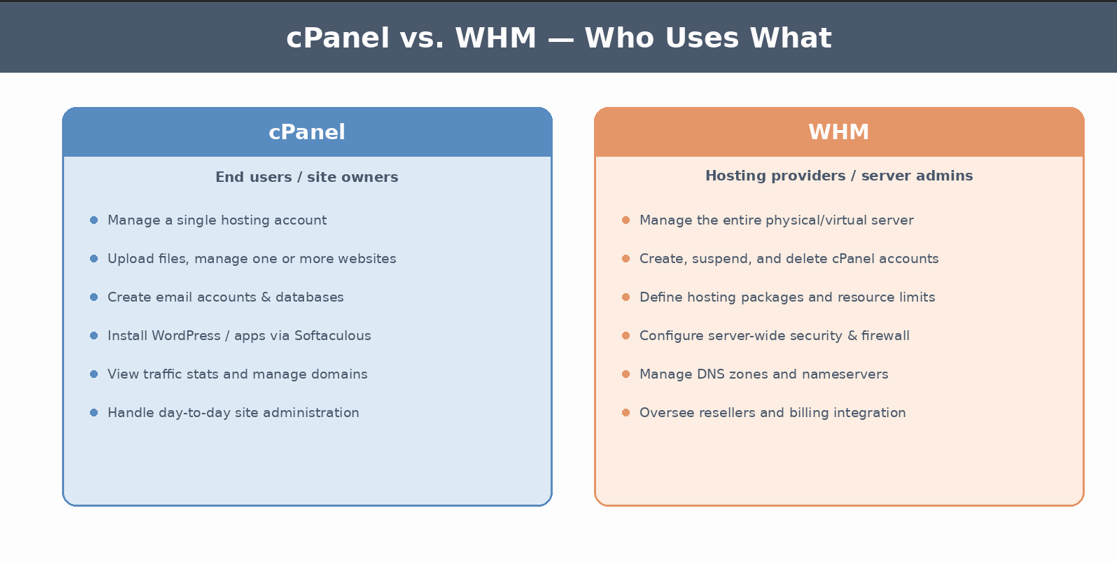
Figure 1 — cPanel is the account-holder's interface; WHM is the administrator's interface to the whole server.
Architecture: Where cPanel Sits in the Stack
Understanding cPanel technically means understanding the layers it coordinates. A typical cPanel & WHM server is built on a supported Linux distribution — currently AlmaLinux, CloudLinux (versions 8 through 10), or Ubuntu 24.04 LTS are the officially supported base operating systems, following cPanel's move away from CentOS after CentOS 8's end of life. On top of that base, cPanel installs and manages:
• A web server — Apache with the EasyApache 4 build system, or NGINX for a growing number of standalone or reverse-proxy configurations, giving administrators modular control over compiled modules and PHP handlers.
• PHP-FPM and the PHP Version Manager, allowing each account or even each subdomain to run a different PHP version side-by-side (critical for shared hosts running mixed legacy and modern applications).
• MySQL or MariaDB (MariaDB 11.8 is now available as an upgrade target), managed through WHM's MySQL/MariaDB Upgrade tool and exposed to users via phpMyAdmin and the MySQL Databases interface.
• Exim as the mail transfer agent, Dovecot for mailbox access, and SpamAssassin for filtering — all configurable per-domain through the Email section of cPanel.
• BIND or the lighter-weight NSD/PowerDNS options for authoritative DNS, surfaced through WHM's DNS Zone Manager and cPanel's Zone Editor.
• cPHulk, ModSecurity, and (as of recent versions) a directly WebPros-managed build of ConfigServer Security & Firewall (CSF) for intrusion detection and brute-force protection.
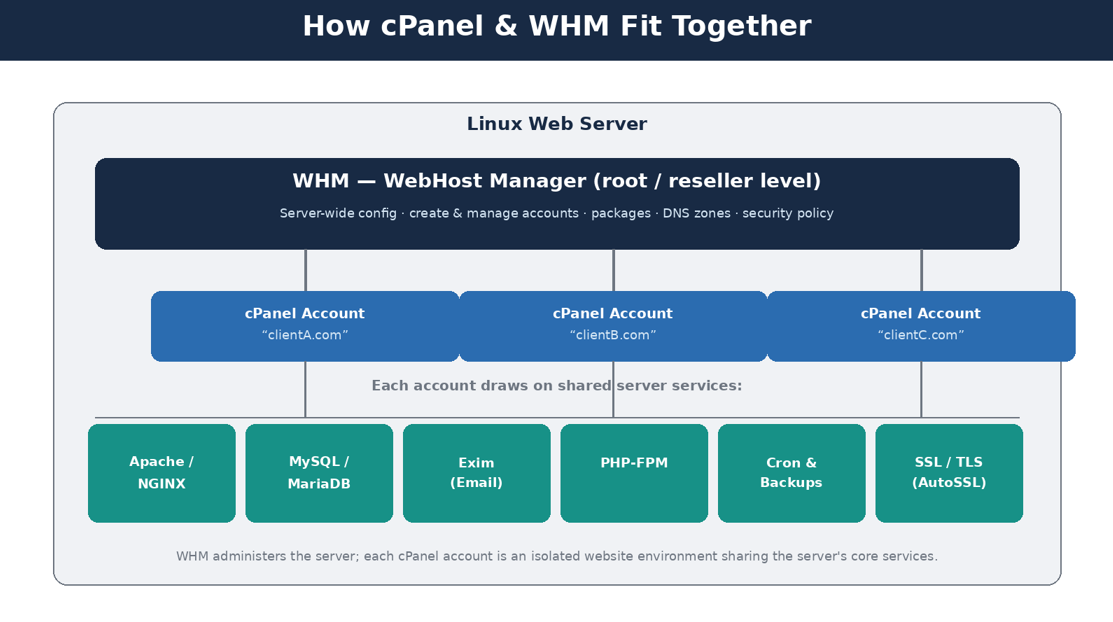
Every one of these subsystems has its own native configuration files and command-line tools. cPanel's real technical value is that it keeps its own account and package metadata (stored largely under /var/cpanel and per-user directories) synchronized with all of those native configs, so that creating one cPanel account atomically provisions a virtual host entry, a system user, a MySQL grant, a mail domain, and a DNS zone — all in one operation, with permissions locked down to prevent one account from touching another's files.
Figure 2 — A simplified view of how WHM, cPanel accounts, and shared server services relate on a single box.
APIs and automation#
For developers, cPanel is not just a UI — it is scriptable. UAPI (Unified API) and WHM API 1 expose nearly every action available in the interface as a JSON-returning HTTP call, authenticated via API tokens rather than passwords. This is what powers WHMCS and other billing/automation platforms: a WHMCS module calls WHM's createacct function to provision a new hosting account the instant an invoice is paid, with zero manual intervention. Recent releases have also added MCP (Model Context Protocol) server prompt support, letting AI assistants and command-based tools issue supported management actions in a structured way — a sign of where control-panel automation is heading.
# Example: list accounts via the WHM API using curl curl -sk -H "Authorization: whm root:API_TOKEN_HERE" \ "https://server.example.com:2087/json-api/listaccts?api.version=1"
Core Feature Walkthrough
cPanel's interface groups dozens of tools into functional categories. The illustration below is a conceptual map of that grouping (the live interface is themed per-host and changes cosmetically over versions, but the functional groupings are consistent).
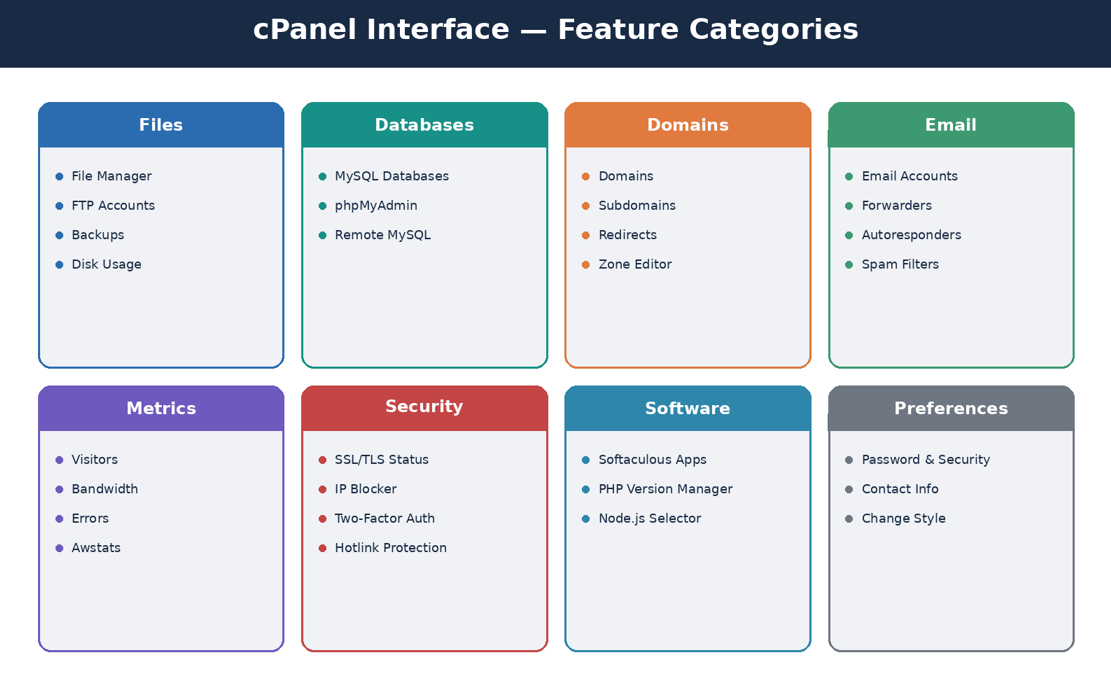
Figure 3 — Functional groupings inside a typical cPanel account interface.
File management#
File Manager provides a browser-based equivalent of an FTP/SFTP client with archive extraction, permission (chmod) editing, and a code editor, but most technical users still prefer direct SFTP or SSH access, which cPanel can enable per-account under Security → SSH Access. Disk Usage Viewer gives a directory-level breakdown that is often the fastest way to diagnose a suddenly full quota.
Databases#
The MySQL Databases tool creates databases and users and manages grants, while phpMyAdmin provides full SQL access for schema work, imports, and exports. Remote MySQL allows whitelisting external IPs to connect directly to the database — essential for decoupled architectures where an application server is hosted separately from the database.
Domains and DNS#
Addon Domains, Subdomains, Aliases, and Redirects handle the common domain-mapping operations, while the Zone Editor exposes raw DNS record management (A, AAAA, CNAME, MX, TXT, SRV, CAA) for developers who need to configure SPF/DKIM records, verify domain ownership for third-party services, or point subdomains at external providers like a CDN or a SaaS product.
Email#
Email Accounts, Forwarders, Autoresponders, and Mailing Lists cover standard mailbox administration. The Email Deliverability tool checks and helps configure SPF, DKIM, and DMARC records automatically — increasingly non-optional now that Gmail and Yahoo enforce strict authentication requirements for bulk senders.
Software and application deployment#
Softaculous (bundled on most cPanel installs) offers one-click installation for WordPress, Joomla, and hundreds of other applications. For custom development, the Setup Node.js App and Setup Python App interfaces let developers deploy applications behind Apache's mod_passenger without hand-writing a reverse proxy configuration, while the PHP Selector/MultiPHP Manager lets each site pin its own PHP version and extension set.
Security#
SSL/TLS Status and AutoSSL issue and renew free domain-validated certificates automatically. Two-Factor Authentication, IP Blocker, and Hotlink Protection round out the account-level controls, while cPHulk (configured at the WHM level) throttles brute-force login attempts across the whole server.
What's New in cPanel & WHM (2026)
cPanel ships frequent point releases; as of version 136 and the surrounding 2026 release cycle, several changes are worth knowing about if you administer or evaluate cPanel today:
Area
What changed
SSL/TLS
A unified SSL/TLS interface merges AutoSSL and paid-certificate management into one workflow, with support for short-lived ACME certificates that auto-renew far more frequently than the traditional 90-day cycle.
WordPress Toolkit
Adds a Security Risk score to prioritize which WP sites need attention, secure one-time sign-on links for admin access, clearer Smart Update logs, and a default wp-cron interval reduced to five minutes.
Logging
PHP error logging is now unified per account, making it much faster to trace a fatal error back to the offending site on a multi-domain account.
Firewall
ConfigServer Security & Firewall (CSF) is now maintained directly by WebPros (cPanel's parent company) rather than a third party, tightening the update pipeline for firewall rules.
AI tooling
An AI Support Agent using semantic search assists administrators with troubleshooting, and an early AI App Builder aims to scaffold simple sites/apps from natural-language prompts.
Platform
Expanded NGINX support for standalone operation, MariaDB 11.8 availability, and accessibility updates aligned with the European Accessibility Act (screen reader support, keyboard navigation, contrast).
OS support
AlmaLinux, CloudLinux 8–10, and Ubuntu 24.04 LTS are supported; Ubuntu 22 systems cannot upgrade in place to version 136 and later.
The direction of travel is clear: shorter-lived, automatically renewing certificates; unified logging and diagnostics; deeper integration with WordPress-specific tooling (still the dominant CMS on cPanel servers); and the beginnings of AI-assisted administration layered onto a two-decade-old, still very Perl-and-shell-centric core.
Security: Hardening a cPanel Server
cPanel ships with sensible defaults, but a production server benefits from deliberate hardening. Because cPanel exposes so much surface area — mail, databases, dozens of hosted domains, an admin panel on port 2087 — it is also a well-studied target, and periodic security advisories (including a widely discussed update in early 2026) are a reminder that patching promptly matters as much as configuration.
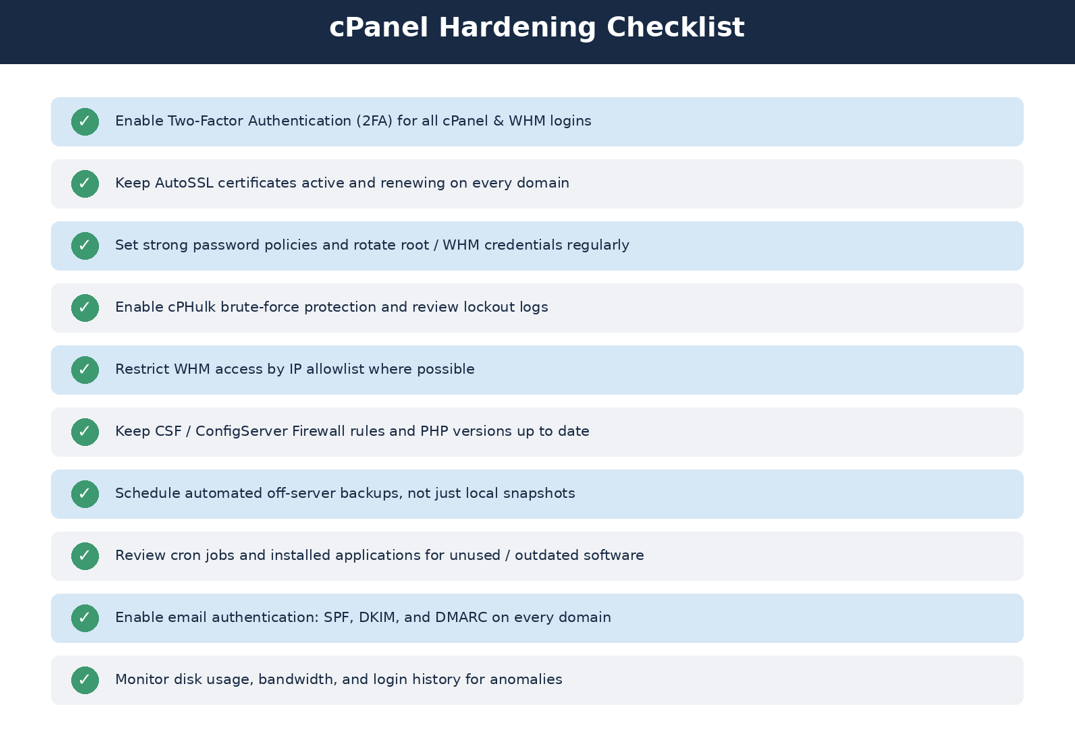
Figure 4 — A practical hardening checklist for cPanel & WHM administrators.
A few of these deserve elaboration for technical readers. Two-factor authentication should be enforced at the WHM level, not just offered — WHM has a policy setting that can require 2FA for all resellers and account owners. cPHulk's brute-force protection should be tuned so that lockout thresholds don't create false-positive denial-of-service against legitimate users behind shared corporate IPs, but are still tight enough to blunt credential-stuffing attempts. AutoSSL failures are also worth actively monitoring rather than assuming silent success: a lapsed certificate on even one addon domain is a common, avoidable outage.
On the backup side, cPanel's native backup system (and the newer Comet Backup integration) supports full-account and incremental backups, but the single highest-value change most administrators can make is ensuring backups are shipped off the physical server — to S3-compatible object storage, a remote FTP/SFTP target, or a dedicated backup provider — so that a compromised or failed host doesn't take its only backup copy down with it.
Performance and Scaling Considerations
On a single shared server, the biggest performance levers available through cPanel are: choosing NGINX (or Apache with mod_php replaced by PHP-FPM) over legacy Apache prefork MPM; enabling OPcache and, where the workload benefits, an object cache like Redis or Memcached (both installable via WHM's plugin/module system); and using CloudLinux's LVE (Lightweight Virtual Environment) resource limits, if available, to prevent one noisy account from starving CPU or I/O from its neighbors on a shared box.
For higher-traffic deployments, cPanel supports a Dedicated IP + reverse-proxy pattern, or moving purely to WHM-managed VPS/dedicated infrastructure where a single account owns the whole server's resources. Where truly large scale is required, many organizations use cPanel only for the parts it is genuinely good at — DNS, mail, and low/medium-traffic client sites — while routing high-traffic production workloads through container orchestration or managed platform services outside of cPanel entirely. Knowing where that line sits for a given project is one of the more important architectural calls a technical lead can make when cPanel is already in the stack.
How cPanel Compares to Alternatives
Control panel
Notable characteristics
cPanel & WHM
Market leader by installed base; Linux only; strongest ecosystem of hosting-provider integrations (WHMCS, billing, automation); paid per-account licensing.
Plesk
Runs on both Linux and Windows; popular with agencies managing mixed-OS environments; comparable feature depth to cPanel.
DirectAdmin
Lighter-weight, generally lower licensing cost, smaller resource footprint; smaller plugin ecosystem.
CyberPanel
Free and open-source, built around OpenLiteSpeed/LiteSpeed for performance-focused, budget-conscious deployments.
Custom / panel-less
Full control via Ansible/Docker/Kubernetes and infrastructure-as-code; no licensing cost but requires in-house operational expertise.
The right choice depends on team size, budget, and how much of the operational burden a business wants to hand off to a packaged tool versus own directly. cPanel's advantage is maturity and ecosystem breadth; its cost is a real per-account license fee and the constraints of working within its opinionated structure rather than a fully custom infrastructure.
Conclusion
Three decades in, cPanel remains the dominant control panel in web hosting because it solves a genuinely hard problem well: giving non-technical account holders safe, self-service control over a complex Linux stack, while giving hosting providers and sysadmins a manageable, scriptable administrative layer over potentially thousands of accounts on one server. For developers, the practical takeaways are to treat cPanel as an API-first platform when automating provisioning, to lean on its native security tooling (2FA, AutoSSL, cPHulk, CSF) rather than reinventing it, and to recognize where its shared-hosting model is the right fit for a project — and where a workload has outgrown it and belongs on dedicated, container-based, or fully custom infrastructure instead.
Sources referenced: cPanel & WHM 2026 release coverage (bacloud.com), version 136 release notes (flexahosting.nl), and current cPanel security guidance from industry hosting blogs (accuwebhosting.com, supportpro.com). Diagrams in this document are original illustrations created for this article and are not screenshots of the live cPanel product.
Rate this article
Be the first to rate this article
Comments & Discussion0
Related articles
WAF Internals  Technical Tutorials
WAF Internals
This deep dive exposes what actually happens under the hood when a WAF encounters malicious traffic in the wild. From post-TLS HTTP dissection and cumulative anomaly scoring engines down to the exact normalization flaws attackers exploit to bypass detection, this guide breaks down how decisions are made, where the logic fails, and how to tune your defenses without shooting your own production traffic in the foot—an uncompromising, engineering-first playbook for real-world application defense.
aiman al-murishStop Wasting Time: Guide to Call Management via 3CX  Technical Tutorials
Stop Wasting Time: Guide to Call Management via 3CX
Missed calls cost you a lot. Discover the benefits of the 3CX cloud system. See usage results that guarantee information security and fast response.
SohobcomContainers-as-a-Service - CaaS  DevOps & Containers
Containers-as-a-Service - CaaS
Containers as a Service (CaaS) is an advanced cloud computing model. This technology enables developers and operations teams to deploy and manage containerized applications using popular build tools such as Docker. It also relies on advanced orchestration and automation engines such as Kubernetes to manage these containers and their clusters, and to scale them automatically as needed. Thus, the platform relieves organizations of the complexities of managing physical infrastructure, enabling them to focus entirely on software development efficiently and securely.
ضياء المعمري